Key takeaways
- Compare computer speakers, a vertical ergonomic mouse, a neon sign, and a wood monitor stand to build a clearer, more comfortable desk setup at home.
A desk setup works best when sound, hand position, screen height, and lighting support the same routine. Small speakers make calls and music easier to follow, while a vertical mouse changes the wrist angle during long stretches of clicking and scrolling. A raised monitor stand and accent light can also make a compact workspace feel more organized.
This guide covers five desk products from different angles. Two speaker options serve different listening styles, one vertical mouse addresses hand comfort, one wooden monitor stand helps with screen height and storage, and one neon sign adds character for a game room. The right choice depends on desk space, sound needs, mouse use, and whether the desk is for work, study, media, or play.
As an Amazon Associate, we earn from qualifying purchases.
How to Choose
Start with the problem you notice most. If laptop speakers sound thin during calls, dedicated speakers are the first step. A 2.0 pair stays compact and puts sound on both sides of the screen. A 2.1 system adds a subwoofer for more low-end weight, but needs space for the extra box and cables. Think about speaker placement and whether a subwoofer would crowd your feet or storage.
Next, consider hand comfort. A flat mouse keeps the hand palm-down for hours, which some people find tiring. A vertical mouse rotates the hand toward a neutral, handshake-like position. It can feel different at first, so think about grip, hand size, and your work. People moving between documents and web pages all day may value steady tracking more than gaming features.
Screen height is another common source of discomfort. If a monitor sits too low, you may look down for long periods. A monitor stand lifts the screen and creates storage underneath for a keyboard or notebook. Before choosing one, measure your monitor base, desk depth, and the height needed to bring the screen closer to eye level.
Lighting matters too. A neon sign will not improve sound or comfort, but it can make a game room or entertainment space feel finished without taking desk surface. Consider wall space, nearby outlets, and evening brightness.
Finally, check connections and controls. Speakers may use an audio cable, USB power, or both. A wireless mouse needs a free port for its receiver. On a small desk, cable length and power needs matter, so confirm each product fits your layout. Compare the five products below by role first, then by details.
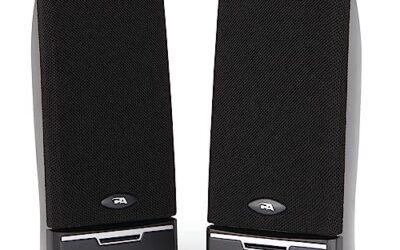
1. Cyber Acoustics CA-2014 2.0 Computer Speakers

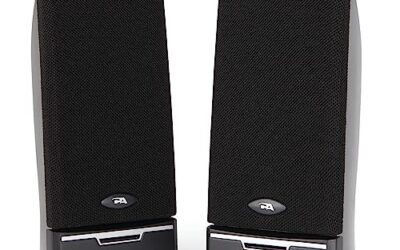
The Cyber Acoustics CA-2014 is a straightforward 2.0 stereo speaker pair built for everyday computer use. It suits desks where space is limited and the main goal is clearer sound than built-in laptop speakers can provide. Two separate speakers let you place sound on either side of a monitor, which helps voices and music feel more centered than a single small speaker. The compact footprint makes it easy to fit beside a screen, on a shelf, or at the back corners of a small desk.
This kind of speaker is often chosen for video calls, online classes, and background music. Setup stays simple: connect the audio cable, provide power, and adjust volume. With no separate subwoofer, the sound focuses on clarity rather than deep bass, which suits speech-heavy use where understanding words matters most. A modest 2.0 pair also keeps volume easier to manage near other people.
Specs
- Configuration: 2.0 stereo computer speakers
- Output: 4 watts total, as stated in the product name
- Use: desktop computer, laptop, and general desk listening
- Design: two compact speaker units for left and right placement
- Controls: volume adjustment for everyday listening
Who It Suits
This speaker pair suits students, home office users, and anyone who wants a simple upgrade from built-in laptop sound. It fits small desks, dorm rooms, and shared work areas where a large speaker system would be too much. If you mainly listen to calls, lessons, podcasts, and light music, the CA-2014 covers the basics in a compact form. People who want strong bass for movies or games may prefer the 2.1 option later in this guide.
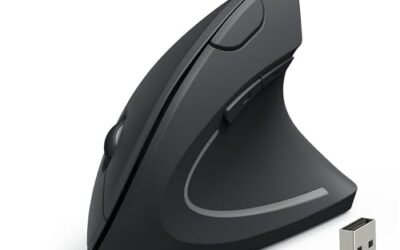
2. Anker 2.4G Wireless Ergonomic Vertical Mouse

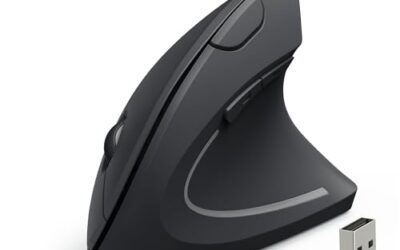
The Anker 2.4G Wireless Ergonomic Mouse is a right-hand vertical mouse designed to change the angle of the hand during computer use. Instead of resting flat, the hand sits in a more upright position, which many users choose for long sessions of office work. The wireless connection uses a USB receiver, so the mouse can move without a cable crossing the desk. That freedom helps when the desk also holds notebooks, a keyboard, and speakers.
A vertical shape takes a short adjustment period. The buttons and scroll wheel suit the upright grip, and cursor movement feels familiar once the hand settles in. This style fits people who spend the day in documents, email, and spreadsheets. It favors steady, comfortable control over fast gaming moves. The right-hand design means left-handed users should look for a left-hand version.
Specs
- Type: vertical ergonomic mouse for the right hand
- Connection: 2.4G wireless with USB receiver
- Use: office work, browsing, documents, and everyday computing
- Design: upright grip intended for a more neutral hand position
- Power: battery powered wireless operation
Who It Suits
This mouse suits office workers, writers, students, and anyone who uses a mouse for several hours at a time and wants a different hand position. It fits desks where cable clutter is a concern and where comfort matters more than gaming features. If you switch between a laptop at home and a desk at work, the small USB receiver makes the mouse easy to carry. People who prefer a traditional flat shape for fast, precise gaming may find the vertical grip less familiar.
3. Gamerneon Blue Poker Neon Sign

The Gamerneon Blue Poker Neon Sign is a wall decoration shaped around casino playing card themes. It is made for game rooms, man caves, bars, and entertainment corners where a desk or table is part of a social space. The blue glow gives the room a distinct evening look and can make a plain wall feel like part of the setup. Because it hangs on the wall, it adds style without using desk surface that speakers and monitors need.
A neon-style sign works best as an accent rather than a main light. It can sit behind a gaming desk or above a card table. The poker theme suits card players and hosts, and pairs well with setups used for streaming or online games. Check wall space and cord routing so the display looks tidy.
Specs
- Type: neon sign wall decoration
- Theme: blue poker and casino playing cards
- Use: game room, man cave, bar area, or entertainment corner
- Placement: wall mounted display
- Light: blue accent glow for evening ambience
Who It Suits
This sign suits people building a game room, a poker corner, or a themed entertainment space at home. It fits hosts who want a backdrop for game nights and players who enjoy casino style decor. If your desk is in a shared living area, the sign can help define the entertainment zone. People who need a plain, professional background for work calls may prefer to keep decor more neutral.
4. GOgroove BassPULSE 2.1 Computer Speakers
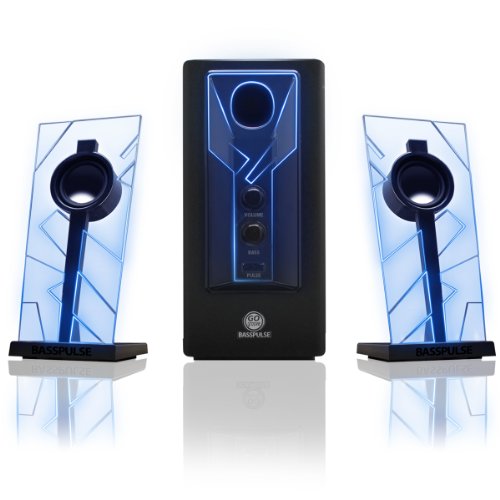
The GOgroove BassPULSE is a 2.1 computer speaker system with two satellite speakers, a powered subwoofer, and blue LED glow lights. The extra subwoofer gives music, movies, and games more low-end presence than a basic 2.0 pair. That makes this system a step up for people who listen to more than speech at their desk. The glowing lights also add a gaming-room feel, matching setups that already use colored lighting.
Placement matters with a 2.1 system. The satellites sit near the monitor, while the subwoofer goes on the floor or a lower shelf. That spreads sound around the listener without crowding the desk. It suits desks used for both work and entertainment, where daytime calls give way to music or games in the evening.
Specs
- Configuration: 2.1 computer speakers with powered subwoofer
- Lighting: blue LED glow lights
- Use: music, movies, games, and general desk listening
- Design: two satellite speakers plus a separate subwoofer unit
- Controls: volume and bass adjustment for different listening needs
Who It Suits
This system suits listeners who want more bass and a fuller sound for entertainment at a desk. It fits gaming setups, bedroom desks, and home offices that double as media spaces. If you watch movies, play games, or listen to bass-heavy music often, the subwoofer adds weight that small speakers cannot match on their own. People with very limited floor space or a need for near-silent shared rooms may prefer the simpler 2.0 pair.
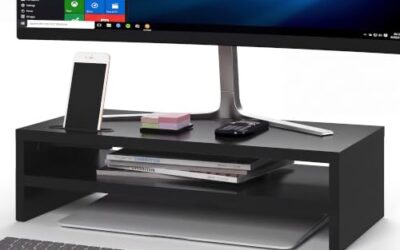
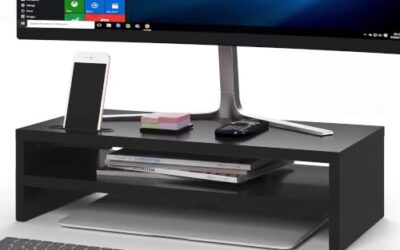
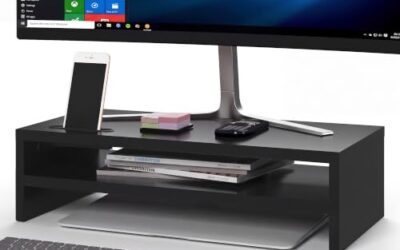
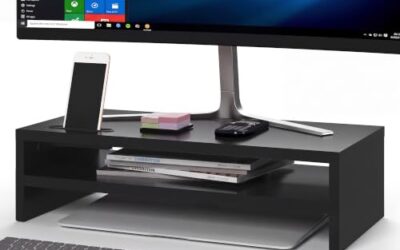
5. BONTEC Wood Monitor Stand Riser

The BONTEC Wood Monitor Stand Riser is a two-tier desktop organizer that lifts a monitor while adding storage space. Raising the screen can bring it closer to eye level, which helps posture during long work sessions. The space underneath and between tiers can hold a keyboard, notebooks, small devices, or desk supplies, keeping the surface clearer. The wood finish gives the desk a warmer look than plain plastic or metal stands.
A riser helps when a monitor base sits flat and leaves no room underneath. Lifting the screen creates a shelf for items that spread across the workspace. The two-tier layout can hold a laptop on one level and accessories on another. Measure your monitor base and desk depth first, and make sure the stand sits fully on a flat surface.
Specs
- Type: wood monitor stand riser and desktop organizer
- Design: two-tier raised platform
- Use: monitor, laptop, and desk storage
- Material: wood finish construction
- Benefit: raises screen height and adds storage underneath
Who It Suits
This stand suits home office users, students, and anyone whose monitor sits too low or whose desk feels crowded. It fits wooden or warm-toned desk setups and rooms where storage space is limited. If you keep a keyboard, notebook, and small accessories on the desk all day, the extra tier helps keep them in reach without clutter. People with very large monitors should confirm the base size fits the platform before ordering.
FAQ
Should I choose 2.0 or 2.1 computer speakers?
Choose 2.0 speakers for a compact setup for calls and light music. Choose a 2.1 system for stronger bass with movies and games, if you have space for a subwoofer. Both improve on laptop speakers but serve different habits.
Does a vertical mouse take time to get used to?
Most people need a short adjustment because the hand sits upright. Cursor movement and buttons work the same way, but the grip feels new at first. Regular use over several days usually makes it feel natural. Left-handed users should choose a left-hand design.
How do I know if a monitor stand is the right height?
Sit in your usual chair and look straight ahead. The top of the screen should sit near eye level. Measure the gap from your current screen position and compare it with the height the stand adds. Check that the platform is wider than your monitor base.
Where should a neon sign go in a desk setup?
Place it on the wall behind or beside the desk, where it adds glow without taking desk space. Avoid direct glare on the screen and plan the cord route. Above a desk or card table, it helps define a game or entertainment corner.
Final Verdict
For a simple sound upgrade, the Cyber Acoustics CA-2014 2.0 speakers cover calls and everyday listening in a compact pair. For fuller entertainment sound, the GOgroove BassPULSE 2.1 system adds a subwoofer and glowing lights that suit gaming and media desks. The Anker vertical mouse is the comfort pick for long hours of office work, while the BONTEC wood monitor stand addresses screen height and desk clutter at the same time. The Gamerneon poker sign finishes the room for people whose desk sits in a game or entertainment space. Choose based on the problem you feel most at your desk, then add the pieces that support how you actually work and relax there.
Product and ASIN Reference
| Product Name | ASIN |
|---|---|
| Cyber Acoustics CA-2014 2.0 Computer Speakers, 4W, Stereo Sound | B00008MN45 |
| Anker 2.4G Wireless Ergonomic Mouse, Right Hand Vertical Mouse USB Receiver | B00BIFNTMC |
| Gamerneon Blue Poker Neon Sign Casino Playing Cards Neon Signs for Man Cave | B09TKHRPYS |
| GOgroove BassPULSE 2.1 Computer Speakers with Blue LED Glow Lights and Powered Subwoofer | B004ALYGI2 |
| BONTEC Wood Monitor Stand Riser, 2-Tier Desktop Organizer | B01M5K9ZTL |