Key takeaways
- Compare compact 2.0 speakers, a 2.1 set with subwoofer, a vertical mouse, a desk riser, and a neon sign for a comfortable, clear-sounding workspace.
A home office works best when sound is clear and your hand stays comfortable through long sessions at the desk. Compact computer speakers keep voices and music close without taking over the surface, while a vertical mouse changes the angle of your wrist and forearm during everyday pointing and scrolling. Together, they address two of the most common comfort issues in a small workspace: muddy laptop audio and a flat, palm-down grip that can feel tiring over time.
This guide compares five products around that goal. Two speaker options cover different desk sizes, from a simple two-channel pair to a set with a powered subwoofer. The vertical mouse, a two-tier monitor riser, and a neon sign round out the setup by supporting posture, screen height, and room feel. Each pick is described by its listed features.
As an Amazon Associate, we earn from qualifying purchases.
How to Choose
Start with the speakers, because they set the footprint for everything else. A 2.0 set uses two satellite speakers and no separate subwoofer, which suits small desks, dorm rooms, and anyone who mostly listens to speech, video calls, and casual music at moderate volume. A 2.1 set adds a powered subwoofer for deeper low end, which helps with movies, games, and music with stronger bass, but it needs floor or under-desk space and a nearby outlet. Check how the speakers connect to your computer, where the volume control sits, and whether the cables reach your setup without stretching across the desk.
For the mouse, consider hand orientation and connection type. A vertical design is held with the thumb up and the palm facing sideways, closer to a handshake position than a traditional flat mouse. That shape can feel more natural for people who notice wrist twist during long workdays, though it usually takes a short adjustment period to aim precisely. Wireless models with a small USB receiver keep the desk clear and work well for laptops, while battery life and sleep behavior matter if you leave the computer on for long stretches. Confirm whether the shape is made for the right or left hand before you commit.
Desk layout ties the pieces together. A monitor riser can lift the screen toward eye level and create storage underneath for a keyboard or notebooks. Measure your desk depth so the riser, speakers, and mouse pad fit without crowding your elbows. Lighting comes last: a neon-style sign adds atmosphere, but it should not reflect on the monitor. Choose the functional pieces first, then add finishing touches.
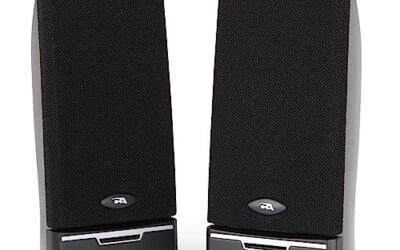
1. Cyber Acoustics CA-2014 2.0 Computer Speakers

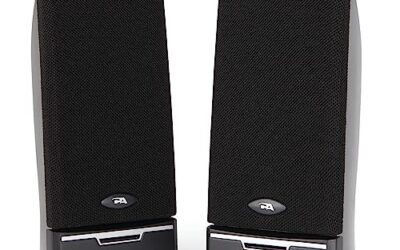
The Cyber Acoustics CA-2014 is a straightforward 2.0 computer speaker pair built for everyday desk listening. With two compact satellites and stereo sound, it is designed to replace thin built-in laptop speakers for video calls, online classes, streaming video, and background music while you work. The small footprint leaves room for a monitor riser, a notebook, and a full-size mouse pad, which makes it a sensible first upgrade for a crowded desk.
With no separate subwoofer, setup stays simple. Place one speaker on each side of the monitor and connect the set to the computer. The listed power suits near-field listening at a desk rather than filling a large room, so expect clarity for voices and general media at moderate levels. For speech, podcasts, and casual music, this pair covers the basics without extra boxes on the floor.
Specs
| Detail | Information |
|---|---|
| Product name | Cyber Acoustics CA-2014 2.0 Computer Speakers, 4W, Stereo Sound |
| Configuration | 2.0 stereo, two satellite speakers |
| Listed power | 4W |
| Intended use | Computer and laptop desk audio |
| ASIN | B00008MN45 |
Who It Suits
This set suits students, remote workers, and anyone with a small desk who wants clearer sound than built-in speakers provide. It also fits shared rooms where keeping volume modest matters. Listeners who want strong bass for movies or games may prefer the 2.1 option below, while speech-focused users will find the compact pair easy to place and easy to live with.
2. GOgroove BassPULSE 2.1 Computer Speakers with Powered Subwoofer
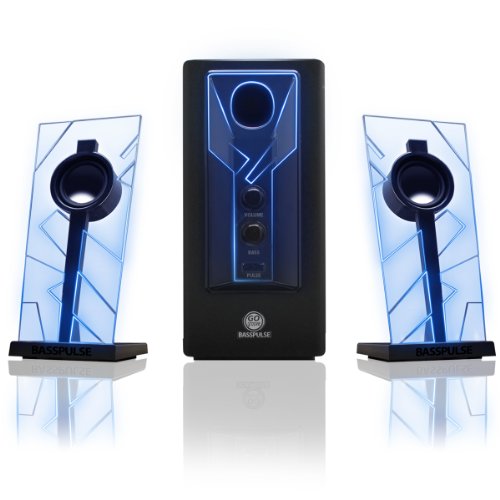
The GOgroove BassPULSE set takes a different approach with a 2.1 layout: two satellite speakers plus a powered subwoofer. That separate low-frequency driver gives music, movies, and games more weight than a compact two-speaker pair can deliver on its own. Blue LED glow lights on the speakers add a gaming-desk look that pairs well with other illuminated gear, and the satellites are sized for placement beside a monitor.
A 2.1 system needs a little more planning. The subwoofer needs floor or lower-shelf space, and cables should be routed away from chair wheels. In return, you get fuller sound for entertainment after work. The powered design means the subwoofer has its own amplification, so the satellites and sub work as a matched set.
Specs
| Detail | Information |
|---|---|
| Product name | GOgroove BassPULSE 2.1 Computer Speakers with Blue LED Glow Lights and Powered Subwoofer |
| Configuration | 2.1, two satellites plus powered subwoofer |
| Lighting | Blue LED glow lights |
| Intended use | Computer audio for music, movies, and games |
| ASIN | B004ALYGI2 |
Who It Suits
This set suits users who split desk time between work and entertainment and want bass presence for media and games. It fits a dedicated home office or gaming corner where under-desk space is available. If desk space is tight or the room is shared and quiet, the smaller 2.0 pair is the simpler choice.
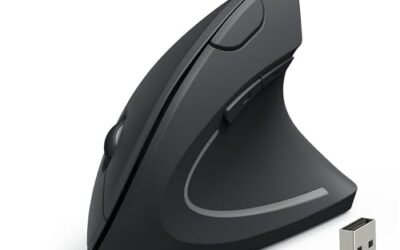
3. Anker 2.4G Wireless Ergonomic Vertical Mouse

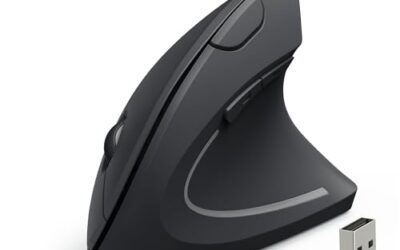
The Anker wireless ergonomic mouse is the comfort centerpiece of this guide. Its vertical shape is designed for the right hand, holding the palm in a sideways, handshake-like position instead of flat on the desk. That orientation reduces the need to twist the forearm while moving the cursor, which many people find more comfortable during long stretches of document work, browsing, and spreadsheet tasks. The 2.4G wireless connection uses a USB receiver, keeping the desk free of a mouse cable.
Switching to a vertical mouse involves a learning curve. Precise movements may feel slower for the first few days while your hand adapts. For general office work, that trade-off is usually worthwhile, while competitive gaming may still favor a traditional shape. Use a smooth pad with room to move your forearm, keep the receiver in a nearby port, and confirm the right-hand design matches your needs.
Specs
| Detail | Information |
|---|---|
| Product name | Anker 2.4G Wireless Ergonomic Mouse, Right Hand Vertical Mouse USB Receiver |
| Connection | 2.4G wireless with USB receiver |
| Shape | Vertical ergonomic, right hand |
| Intended use | Office and everyday computer control |
| ASIN | B00BIFNTMC |
Who It Suits
This mouse suits right-handed users who spend long hours at a computer and want a more neutral wrist position. It fits home offices, study desks, and anyone moving from a flat mouse for comfort reasons. Left-handed users should look for a left-hand vertical model instead, and users who need a wired connection for specific setups should confirm the receiver arrangement works with their ports.
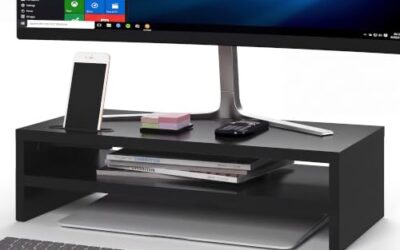
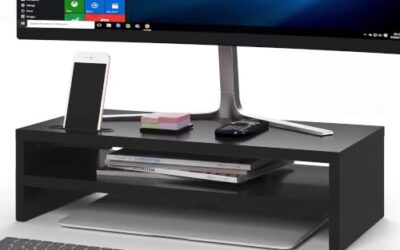
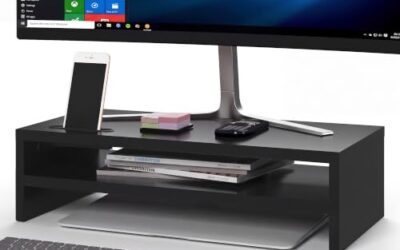
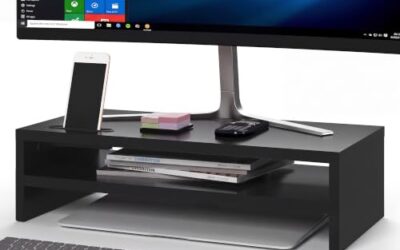
4. BONTEC Wood Monitor Stand Riser, 2-Tier Desktop Organizer

The BONTEC wood monitor stand riser supports the rest of the setup by raising the screen and organizing the desk surface. A two-tier design creates a raised platform for the monitor and storage space below for a keyboard, notebooks, or small accessories. Lifting the display closer to eye level can make it easier to sit upright instead of leaning toward a low laptop screen, and the cleared space underneath helps keep speaker cables and charging cords from spreading across the desk.
Wood construction gives the riser a warm, furniture-like look. Measure your monitor base and desk depth, and confirm the platform height works with your chair and screen. Compact satellites can flank the raised monitor, while the space below holds the keyboard when you need room to write. Used well, it turns a flat desk into a layered workspace.
Specs
| Detail | Information |
|---|---|
| Product name | BONTEC Wood Monitor Stand Riser, 2-Tier Desktop Organizer |
| Design | Two-tier desktop riser and organizer |
| Material | Wood |
| Intended use | Monitor elevation and desk storage |
| ASIN | B01M5K9ZTL |
Who It Suits
This riser suits anyone using a single monitor or a laptop on a stand who wants better screen height and tidier storage. It fits home offices where the desk doubles as a writing surface. Users with very shallow desks should measure carefully, and those with large multi-monitor arms may not need a riser at all.
5. Gamerneon Blue Poker Neon Sign

The Gamerneon blue poker neon sign is the decorative finishing touch in this lineup. Shaped around a casino playing cards theme, it adds colored light and personality to a game room, streaming background, or home office that doubles as an entertainment space. A sign like this does not change how your computer performs, but it changes how the room feels during evening sessions, video calls with a visible background, or casual gatherings around the desk.
Placement matters most. Put the sign behind or beside the monitor so its glow does not reflect on the screen, and route the cable away from chair wheels. Blue light pairs naturally with LED desk lighting. If the room is also used for daytime work, switch the sign off during work hours to keep the space calm.
Specs
| Detail | Information |
|---|---|
| Product name | Gamerneon Blue Poker Neon Sign Casino Playing Cards Neon Signs for Man Cave |
| Theme | Poker and casino playing cards |
| Color | Blue |
| Intended use | Decorative wall or desk lighting for game rooms and offices |
| ASIN | B09TKHRPYS |
Who It Suits
This sign suits gamers, streamers, and anyone building a relaxed entertainment corner around the computer. It fits rooms where atmosphere matters as much as function. Users who prefer a minimal, distraction-free office may skip decorative lighting and put the same wall space to work with shelves or a plain backdrop instead.
FAQ
Is a 2.0 or 2.1 speaker set better for a home office?
A 2.0 set is better when desk space is limited and listening centers on calls, classes, and casual music. A 2.1 set is better when you also watch movies or play games at the desk and want stronger bass from a separate subwoofer. Choose based on available space first, then on how much low-end sound your media needs.
How long does it take to get used to a vertical mouse?
Most people need a few days of regular use to feel accurate with a vertical grip. Start with everyday tasks such as email and browsing, keep the pointer speed at a moderate setting, and give your forearm room to move. If precise work feels slow at first, that is normal during the adjustment period.
Can a monitor riser work with a laptop instead of a separate monitor?
Yes, a riser can raise a laptop screen toward eye level, though you will usually want an external keyboard and mouse for comfortable typing and pointing at that height. A vertical mouse pairs well with that arrangement. Measure the riser platform against your laptop footprint before deciding.
Where should a neon sign go in a desk setup?
Place it on the wall behind or beside the monitor so the light adds background atmosphere without reflecting on the screen. Keep cables tidy and the sign out of reach of chair movement. If you take video calls, check how the sign appears on camera before your first meeting with it on.
Final Verdict
Start with the speakers that fit your space, add the vertical mouse for daily comfort, and use the riser to organize what remains. Choose the Cyber Acoustics 2.0 pair for a compact, speech-focused desk, or the GOgroove 2.1 set when entertainment sound matters. The Anker mouse suits right-handed users who spend long hours at the computer, and the BONTEC riser improves screen height with less clutter. Add the Gamerneon sign when the room doubles as a gaming or streaming space.
Product and ASIN Reference
| Product name | ASIN |
|---|---|
| Cyber Acoustics CA-2014 2.0 Computer Speakers, 4W, Stereo Sound | B00008MN45 |
| GOgroove BassPULSE 2.1 Computer Speakers with Blue LED Glow Lights and Powered Subwoofer | B004ALYGI2 |
| Anker 2.4G Wireless Ergonomic Mouse, Right Hand Vertical Mouse USB Receiver | B00BIFNTMC |
| BONTEC Wood Monitor Stand Riser, 2-Tier Desktop Organizer | B01M5K9ZTL |
| Gamerneon Blue Poker Neon Sign Casino Playing Cards Neon Signs for Man Cave | B09TKHRPYS |