Key takeaways
- Compare the best monitor stands and phone chargers for a tidy desk, including wood risers, lightning cables, ethernet cables, TV mounts, and phone cases.
A desk setup works better when the screen sits at a comfortable height and the phone stays charged without a tangle of loose cables. The right stand raises a monitor to eye level, frees up space underneath for a keyboard or notebook, and keeps the work surface clear. Alongside it, a reliable charging cable, a fast network connection, and proper protection for the phone round out a practical everyday workstation.
This guide brings together five products that cover those needs from different angles. There is a two-tier wood monitor stand for desk organization, a two-pack of lightning charging cables for Apple devices, a Cat 6A ethernet cable for a wired network connection, a full-motion wall mount for a small monitor or TV, and a rugged phone case for day-to-day protection. Each one suits a slightly different setup, so the sections below explain what each product does, how it fits into a desk, and who it makes the most sense for.
As an Amazon Associate, we earn from qualifying purchases.
How to Choose
Start with the screen. If the monitor currently sits flat on the desk and causes neck strain, a riser stand or a wall mount can lift it to a more comfortable height. A stand is the simpler choice because it needs no installation and adds storage space underneath, while a wall mount frees the desk surface entirely but requires drilling and a suitable wall.
Next, think about power and connections. A phone that charges at the desk needs a cable that matches its connector, and keeping a spare cable in another room or bag avoids unplugging the main one. For a desktop or laptop that stays in one place, a wired ethernet connection is generally more stable than wireless, especially for large file transfers, video calls, and online gaming. Check that the cable category and length match the run between the router and the desk.
Finally, consider protection and clutter. A rugged case helps a phone survive drops on hard floors, and cable management, whether through a stand with open tiers or simple clips, keeps the desk tidy. Measure the desk depth and the monitor base before ordering a stand, and confirm screen size and mounting pattern before choosing a wall mount.
Budget and room layout matter too. A stand and a cable are quick additions that work in almost any room, while a wall mount is a bigger commitment that pays off when desk space is scarce. If the desk sits against a wall, a mount can place the screen exactly at eye level and leave the whole surface free for a laptop, keyboard, and papers. If the desk stands in the middle of a room or against a window, a stand is usually more practical.
It also helps to think about how the setup will grow. A two-tier stand leaves room for a second small device later, such as a tablet or a speaker, and spare charging cables cover guests or a second phone. An ethernet run installed once can serve a desktop today and a console or streaming box later. Planning for that flexibility avoids buying the same accessories twice.
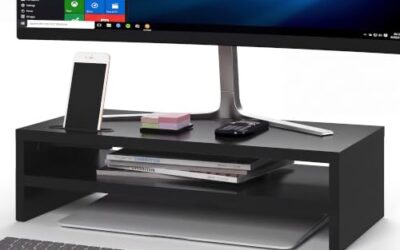
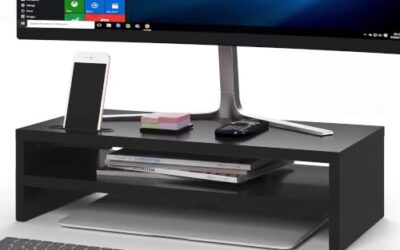
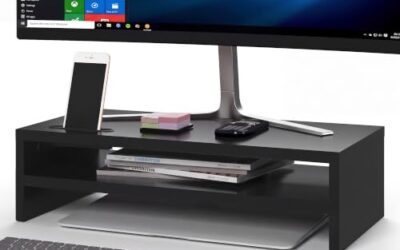
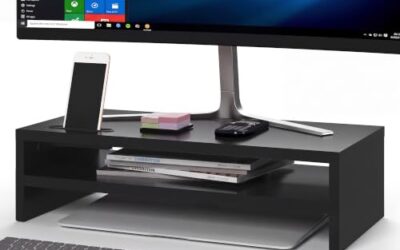
BONTEC Wood Monitor Stand Riser, 2-Tier Desktop Organizer

Specs
| Detail | Value |
|---|---|
| Type | Two-tier wood monitor stand riser |
| Use | Raises a monitor while organizing the desktop |
| Design | Two stacked shelves with open space between |
| Placement | Sits on top of the desk, no installation |
Who It Suits
This stand suits anyone whose monitor sits too low and whose desk feels crowded. The two tiers lift the screen toward eye level while creating storage levels for a keyboard, notebook, phone, or small office supplies. Because it simply sits on the desk, it works well for renters or anyone who does not want to drill into a wall. The wood finish also fits home offices where appearance matters as much as function. It is a sensible pick for a single-monitor setup on a standard desk, and the open design keeps frequently used items within easy reach instead of buried in a drawer.
TrimDish iPhone Charger, 2Pack Lightning Cable

Specs
| Detail | Value |
|---|---|
| Type | Lightning charging cable |
| Quantity | Two-pack |
| Compatibility | Apple devices with a Lightning connector |
| Use | Charging and syncing at home, office, or travel |
Who It Suits
This two-pack suits iPhone users who want a charging cable in more than one place. Keeping one cable at the desk and the second in a bedroom, car, or bag means the phone can charge wherever it happens to be, without moving a single cable around. It also works as a spare for households where cables tend to wear out or go missing. Anyone setting up a charging spot next to a monitor stand will appreciate having a dedicated cable that stays plugged in. Note that this is a Lightning cable, so it fits Apple devices with that connector rather than newer USB-C models.
Syston Cable Technology Cat 6A Plus Ethernet Network Cable

Specs
| Detail | Value |
|---|---|
| Type | Cat 6A Plus ethernet network cable |
| Rating | 750MHz, 23AWG solid conductor |
| Use | Wired network connection for desktop, laptop, or console |
| Design | Solid-core cable for stable high-speed links |
Who It Suits
This cable suits anyone who wants a wired connection instead of relying on wireless. A Cat 6A cable supports high-speed networking over typical home and office distances, which helps with large downloads, streaming, and video calls that can stutter on a weak wireless signal. The solid 23AWG conductor is built for consistent performance on fixed runs, such as from a router to a desk in the same room or through a wall plate. It is a good match for a desk setup that includes a desktop computer, a gaming console, or a work laptop docked in one place. Choose a length that reaches comfortably without excess slack coiling behind the desk.
WALI TV Wall Mount Full Motion for 13-32 inch Monitor

Specs
| Detail | Value |
|---|---|
| Type | Full-motion TV and monitor wall mount |
| Screen size | Fits 13 to 32 inch screens |
| Movement | Articulating arm for tilt and swivel adjustment |
| Use | Wall-mounting a small monitor or TV |
Who It Suits
This mount suits anyone who wants the screen off the desk entirely. The full-motion arm lets the screen tilt and swivel, so it can face a desk chair during work and turn toward the room at other times. It fits small monitors and TVs in the 13 to 32 inch range, which covers many secondary displays, kitchen TVs, and compact gaming setups. Freeing the desk surface leaves more room for a keyboard, papers, or a laptop. Because it mounts to the wall, it suits homeowners or anyone allowed to drill, and the screen mounting pattern and wall studs should be checked before installation.
Miracase Glass Series for iPhone 11 Case

Specs
| Detail | Value |
|---|---|
| Type | Full-body rugged phone case |
| Compatibility | iPhone 11, 6.1 inch |
| Design | Glass Series with full-body coverage |
| Use | Everyday drop and scratch protection |
Who It Suits
This case suits iPhone 11 owners who want stronger protection than a thin shell provides. Full-body coverage wraps the phone more completely, which helps against drops onto hard floors and knocks against desk edges. It makes sense for anyone who carries the phone around a workshop, kitchen, or busy household, or who simply drops phones often. Pairing a protective case with a desk charging cable means the phone can sit on the stand or desk, charge, and still be guarded against accidents. Check that the case matches the exact phone model, since it is made for the 6.1 inch iPhone 11.
FAQ
Is a monitor stand or a wall mount better for a small desk?
A stand is easier because it needs no installation and adds storage tiers, which helps a crowded desk. A wall mount frees the desk surface completely and allows more screen adjustment, but it requires drilling and a suitable wall. For a rented room or a desk that moves, a stand is usually the simpler choice.
Do I need a wired ethernet cable if my wireless connection seems fine?
A wired connection is generally more stable and consistent than wireless, especially when several devices share the network or the router is far from the desk. If video calls freeze or downloads slow down at busy times, a Cat 6A cable to the desk can make a noticeable difference. It is most worthwhile for a computer that stays in one place.
Will the lightning cables work with newer iPhones?
These cables use the Lightning connector, so they fit Apple devices with a Lightning port. Newer iPhone models use USB-C instead and would need a different cable. Check the connector on the phone before ordering to be sure the cable matches.
What should I check before buying a wall mount?
Confirm the screen size falls within the mount range, check that the mounting hole pattern on the back of the screen matches the mount, and make sure the wall can support the combined weight. Locating studs or using suitable anchors matters for a secure installation.
Final Verdict
For most desk setups, the BONTEC two-tier wood monitor stand is the simplest upgrade, raising the screen and organizing the surface at the same time. Pair it with the TrimDish lightning cables to keep an iPhone charged at the desk, and add the Syston Cat 6A ethernet cable if a stable wired connection matters. The WALI full-motion mount is the better pick when desk space is tight and the screen can go on the wall, while the Miracase case rounds out the setup by protecting the phone that lives on the desk. Choose based on whether the priority is screen height, charging convenience, network stability, or freeing up space.
A practical order of purchase is to fix the screen position first, since that affects comfort every hour at the desk, then sort out charging so the phone always has a home, and finally add the wired network cable if the connection needs it. The case can come at any point, but it is cheapest insurance against the most common accident, a phone sliding off the desk edge. Together, these five products cover the basics of a tidy, comfortable, and connected workspace without any complicated installation beyond the optional wall mount.
Product and ASIN Reference
| Product | ASIN |
|---|---|
| BONTEC Wood Monitor Stand Riser, 2-Tier Desktop Organizer | B01M5K9ZTL |
| TrimDish iPhone Charger, 2Pack Lightning Cable | B093PPQK4N |
| Syston Cable Technology Cat 6A Plus Ethernet Network Cable | B0CD77C98Y |
| Miracase Glass Series for iPhone 11 Case | B09YPSMJHF |
| WALI TV Wall Mount Full Motion for 13-32 inch Monitor | B01BCUM766 |