Key takeaways
- Compare monitor stands, Ethernet cables, mounts, chargers, and cases that lift screens, route cords, and keep a compact desk tidy, connected, and ready.
A cramped desk rarely fails because of one big problem. It fails because the monitor sits too low, the network cable drapes across the keyboard tray, and the charger you need is buried under a notebook. Small fixes add up quickly: raising the screen to a comfortable height, running a wired connection that stays out of the way, and giving every cord a short, predictable path. None of that requires a full desk rebuild, and it works just as well in a spare bedroom office as it does on a shared table.
This guide covers five pieces that work as a simple desk kit. A two-tier wood monitor riser lifts the screen and frees up the surface underneath. A Cat 6A Ethernet cable handles the wired connection for a desktop, dock, or media player. A full-motion wall mount suits readers who would rather get the screen off the desk entirely. A two-pack of Lightning charging cables covers the daily top-up routine, and a rugged phone case rounds out the setup for anyone whose phone lives beside the keyboard. Each product below includes specs drawn from its listing, with anything unconfirmed marked as not stated.
As an Amazon Associate, we earn from qualifying purchases.
How to Choose
Start with screen height. Most people read and type more comfortably when the top of the screen sits near eye level, and a riser or mount is the easiest way to get there without stacking books. A desktop riser keeps the monitor on the desk and adds a shelf for a keyboard, notebook, or small speaker underneath. A wall mount moves the screen off the surface completely, which helps on narrow desks, but it needs a stud or suitable anchors and a wall you are allowed to drill into. Measure your desk depth before choosing, because a deep riser can push the screen farther back than you want.
Next, think about the wired connection. A Cat 6A cable supports high-speed Ethernet over longer runs and resists interference better than older categories, which matters when the cable passes near power strips and chargers. Solid-core conductors are generally used for fixed runs, while stranded cable bends more easily for short patch leads. Check the length you actually need from the router or switch to the desk, then add a little slack for routing around furniture rather than stretching the cable tight across the floor.
Finally, cover the small daily items. Charging cables wear out at the connector first, so a spare in the drawer prevents the usual scramble. A phone case with raised edges protects the screen and camera when the phone slides around a busy desk.
BONTEC Wood Monitor Stand Riser, 2-Tier Desktop Organizer

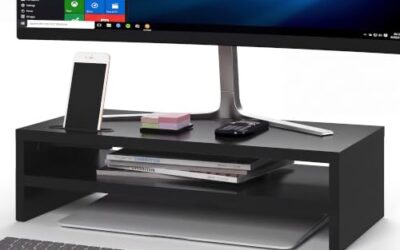
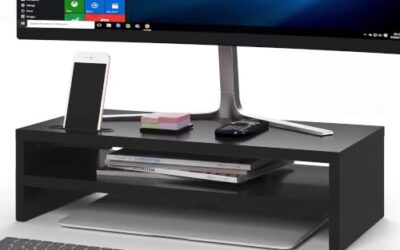
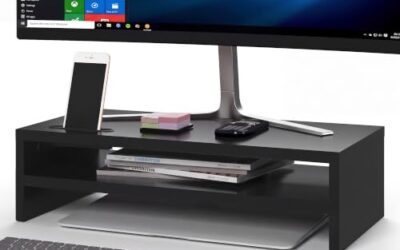
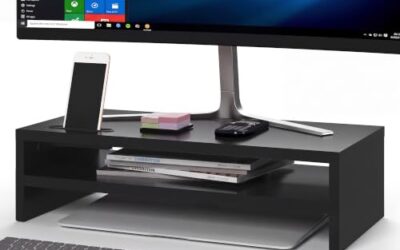
The BONTEC Wood Monitor Stand Riser, 2-Tier Desktop Organizer is a wooden riser that lifts a monitor, laptop, or small all-in-one computer while adding a lower shelf for storage. The two-tier layout separates the screen from the clutter: the top deck holds the display, and the shelf below can take a keyboard when it is not in use, a notebook, or a compact speaker. A wood finish suits desks that already use wood tones, and it reads warmer than plain plastic risers in a home office.
Specs
| Detail | Value |
|---|---|
| Type | Two-tier desktop monitor riser |
| Material | Wood |
| Use | Monitor, laptop, or desktop organizer |
| Load capacity | Not stated |
| Dimensions | Not stated |
| Color options | Not stated |
Who It Suits
This riser suits readers who want the screen higher without drilling into a wall, and who also need a home for a keyboard or papers between sessions. The lower shelf is handy for stashing a notebook or a small hub out of sight. It is less suited to very large or heavy monitors if the load rating matters to you, since the listing does not state one; check your screen weight against the product page before ordering if that is a concern.
Syston Cable Technology Cat 6A Plus Ethernet Network Cable, 750MHz 23AWG Solid

The Syston Cable Technology Cat 6A Plus Ethernet Network Cable, 750MHz 23AWG Solid is a Cat 6A network cable built for wired connections between a router, switch, wall jack, and a computer or media device. The 750MHz bandwidth rating and 23AWG solid conductors point to a cable intended for stable high-speed links, including runs that pass near other electronics. A wired connection like this is a sensible pick for a desktop that streams, games, or joins video calls from a fixed desk.
Specs
| Detail | Value |
|---|---|
| Category | Cat 6A |
| Bandwidth | 750MHz |
| Conductor | 23AWG solid |
| Shielding | Not stated |
| Available lengths | Not stated |
| Jacket material | Not stated |
Who It Suits
This cable suits anyone setting up a fixed desk connection who wants the reliability of a wired link rather than relying on Wi-Fi through walls. Solid conductors favor permanent or semi-permanent runs where the cable is routed once and left alone. If you constantly plug and unplug a laptop at different spots, a more flexible stranded patch cable may handle the bending better; for a set-and-forget desk run, this style makes sense.
TrimDish iPhone Charger, 2Pack Lightning Cable Apple Charging

The TrimDish iPhone Charger, 2Pack Lightning Cable Apple Charging is a two-pack of Lightning charging cables for iPhone and other Lightning-equipped Apple devices. A two-pack lets you keep one cable at the desk and one in a bag or bedroom, so the phone can charge wherever it lands. Spare cables are a small thing until the only one you own frays at the connector on a workday morning.
Specs
| Detail | Value |
|---|---|
| Connector | Lightning |
| Pack size | 2 cables |
| Use | Charging Apple devices |
| Cable length | Not stated |
| Jacket material | Not stated |
| Fast-charge support | Not stated |
Who It Suits
This pack suits iPhone owners who want a dedicated desk cable plus a backup without buying singles at different times. It also works for households with more than one Lightning device, since the second cable can live at a nightstand or in a travel pouch. If you need a specific length for a tall desk or a far outlet, confirm the length on the product page, because the listing summary does not state it.
Miracase Glass Series for iPhone 11 Case 6.1 inch, Full-Body Rugged

The Miracase Glass Series for iPhone 11 Case 6.1 inch, Full-Body Rugged is a full-body rugged case sized for the 6.1 inch iPhone 11. Full-body designs typically wrap the back, sides, and corners and pair with a screen cover or raised lip so the display does not sit flat against a desk. For a phone that spends the day next to a keyboard, gets slid aside for papers, and occasionally knocks against a mug, that extra coverage is the point.
Specs
| Detail | Value |
|---|---|
| Compatibility | iPhone 11, 6.1 inch |
| Style | Full-body rugged case |
| Series | Glass Series |
| Screen protection | Not stated |
| Wireless charging support | Not stated |
| Color options | Not stated |
Who It Suits
This case suits iPhone 11 owners who want heavier everyday protection than a slim shell provides, especially if the phone travels between desk, pocket, and bag all day. The full-body format favors grip and corner coverage over thinness. If you use a magnetic mount or a specific wireless charger, check compatibility on the product page first, since the listing summary does not confirm those details.
WALI TV Wall Mount Full Motion for 13-32 inch Monitor

The WALI TV Wall Mount Full Motion for 13-32 inch Monitor is a full-motion wall mount sized for smaller televisions and monitors in the 13 to 32 inch range. Full-motion arms let the screen tilt, swivel, and extend away from the wall, which helps when the desk faces a corner or when two people share one display from different angles. Moving the screen to the wall frees the entire desk surface for a keyboard, notebook, and lamp.
Specs
| Detail | Value |
|---|---|
| Screen size range | 13 to 32 inch |
| Mount type | Full motion |
| Use | TV or monitor wall mounting |
| VESA pattern | Not stated |
| Load capacity | Not stated |
| Extension range | Not stated |
Who It Suits
This mount suits readers with a small monitor or TV who want the desk completely clear and the screen adjustable for different seating positions. Renters who cannot drill, or anyone with a screen larger than 32 inches, should look at a riser instead; and as with any mount, confirm the VESA pattern and weight rating on the product page before ordering.
Putting the Desk Setup Together
A practical order helps. Place the riser or mount first and set the screen height so you can read without leaning forward. Then run the Ethernet cable along the back edge of the desk or down a leg, keeping it away from the chair path, and leave a small service loop near the computer so the desk can shift without straining the connector. Keep the charging cable and phone in one corner, ideally the side away from your mouse hand, so cords never cross the keyboard. If you use the wall mount, route the network and power cables together down the wall with clips so nothing dangles behind the desk.
Care and Setup Notes
Wood risers clean up with a dry or slightly damp cloth; avoid soaking the finish. Ethernet cables should not be pinched under desk legs or bent at sharp angles, since tight bends can damage the pairs inside. For the wall mount, recheck the arm tension after the first week, because a screen that slowly droops usually just needs the tilt joint tightened.
FAQ
Is a monitor riser or a wall mount better for a small desk?
A wall mount frees the most surface, which helps on narrow desks, but it requires drilling and a suitable wall. A riser needs no tools and adds storage underneath, at the cost of keeping the screen footprint on the desk. Choose based on whether you can drill and how much surface you need back.
Does a Cat 6A cable help if my internet plan is slower?
The cable category sets the ceiling for the local link between your device and router or switch, not the speed of your internet plan. A Cat 6A cable still gives a stable wired connection and leaves headroom for faster local transfers, such as moving files between computers on the same network.
Can I use the wall mount for a computer monitor?
Yes, within the stated 13 to 32 inch size range, provided the monitor has a compatible mounting pattern. Confirm the VESA pattern and the screen weight against the product page, since those details are not stated in the listing summary used here.
Why keep a second charging cable at the desk?
A dedicated desk cable stays plugged in and routed, so the phone charges in the same spot every day and the cable does not get bent in a bag. The spare covers travel or a bedroom, and it means a worn connector never leaves you without a working charger.
Final Verdict
For most home desks, the riser and the Cat 6A cable do the heavy lifting: one fixes screen height and storage, the other gives a dependable wired connection that stays out of the way. The WALI mount is the better pick when desk space is truly tight and drilling is allowed. The two-pack Lightning cables and the Miracase full-body case are inexpensive supporting pieces that keep the phone charged and protected beside the keyboard. Match the riser or mount to your screen size, confirm any unstated ratings on the product pages, and the whole setup comes together in an afternoon.
Product and ASIN Reference
| Product | ASIN |
|---|---|
| BONTEC Wood Monitor Stand Riser, 2-Tier Desktop Organizer | B01M5K9ZTL |
| Syston Cable Technology Cat 6A Plus Ethernet Network Cable, 750MHz 23AWG Solid | B0CD77C98Y |
| TrimDish iPhone Charger, 2Pack Lightning Cable Apple Charging | B093PPQK4N |
| Miracase Glass Series for iPhone 11 Case 6.1 inch, Full-Body Rugged | B09YPSMJHF |
| WALI TV Wall Mount Full Motion for 13-32 inch Monitor | B01BCUM766 |