We independently review everything we recommend. When you buy through our links, we may earn a commission. As an Amazon Associate we earn from qualifying purchases.
Best Keyboards for Battlefield 4
Compare the best gaming keyboards by switch type, polling rate, layout and keycaps, with four verified mechanical and magnetic picks for fast PC play.
Compare the best gaming keyboards by switch type, polling rate, layout and keycaps, with four verified mechanical and magnetic picks for fast PC play.
As an Amazon Associate we earn from qualifying purchases.
A fast first-person shooter is an unforgiving test of a keyboard. Movement, sprinting, crouching, leaning, switching weapons and calling out targets all happen through the same cluster of keys, often several at once, and a board that misses an input, registers a key late or feels vague under your fingers will cost you exchanges that have nothing to do with your aim. The good news is that modern gaming keyboards have converged on a set of features that genuinely help: fast switches, high polling rates, proper anti-ghosting, durable keycaps and layouts that leave the mouse room to move.
This guide compares four verified gaming keyboards from four different makers, and they cover the main approaches a PC player can choose today. There is a full-size mechanical board with dedicated macro keys, a tenkeyless board with magnetic analog switches and rapid trigger, a tenkeyless board with adjustable actuation and its own small display, and a full-size mechanical board built around very fast polling. The sections below explain what each specification actually does in play, so you can match a board to the way you play rather than to the longest feature list.
Disclosure: This article contains affiliate links. If you buy through these links, we may earn a commission at no additional cost to you.
How to Choose a Gaming Keyboard
Switch type: mechanical, optical and magnetic
The switch under each keycap decides how a keyboard feels and, increasingly, how fast it responds. Traditional mechanical switches, like the Cherry MX switches in the Corsair board in this guide and the Razer mechanical switches in the Razer board, register a keypress at a fixed actuation point and give a clear, consistent feel that most players already know. Linear switches travel smoothly with no bump, which suits rapid repeated movement inputs, while tactile and clicky switches add a bump you can feel, which some players prefer for confirming an input without looking down.
Magnetic, or Hall-effect, switches are the newer option, used by the Logitech and SteelSeries boards here. Because they sense the key’s position magnetically rather than through a fixed contact, they can offer adjustable actuation — you choose how far a key travels before it registers — and rapid trigger, which resets a key the moment it starts to rise rather than at a fixed reset point. In a shooter, rapid trigger makes strafing and counter-strafing feel more immediate, because a direction key stops and restarts exactly when your finger moves, not when the switch reaches a preset height.
Polling rate
Polling rate is how often the keyboard reports its state to the PC, measured in hertz. A standard board reports 1,000 times per second. The Corsair board in this guide states 8,000Hz hyper-polling, which cuts the reporting interval to a fraction of a millisecond. The honest summary is that high polling is a small, real advantage rather than a transformation: it removes one link in the input chain, and players on high-refresh monitors who notice input timing are the ones most likely to value it. It should never be the only reason to choose a board over better switches or a better layout.
Layout: full-size, tenkeyless and compact
Layout decides how much desk your keyboard takes and how much room your mouse hand gets. A full-size board keeps the number pad, which helps in games and applications that bind commands to it and for everyday number entry, but it pushes the mouse further out to the side. A tenkeyless board drops the number pad, bringing the mouse closer and freeing space for wide mouse sweeps, which is why both magnetic boards in this guide use that layout. For a dedicated gaming desk, tenkeyless is usually the comfortable default; for a desk that also does office work all day, full-size earns its width.
Anti-ghosting and key rollover
When several keys go down together — running diagonally while crouching and switching weapons, for example — a poor keyboard can drop one of them. N-key rollover and anti-ghosting, both stated on the Corsair listing in this guide, mean every simultaneous press is reported correctly. This is a baseline requirement for a gaming board rather than a premium extra, and any board you consider should state it. Features such as SOCD handling, also stated on that listing, govern how the board resolves opposite direction keys pressed at the same time, which matters for clean strafing.
Keycaps and build
Keycaps are what your fingers actually touch for hours at a time. PBT keycaps, used by the Logitech, SteelSeries and Corsair boards here, resist the shine and wear that develop on standard ABS caps and keep their texture longer. Double-shot construction, where the legend is moulded through the cap rather than printed on it, means the letters do not fade. Razer’s board uses doubleshot ABS caps, which keep the same unfading legends with a slightly different feel. A wrist rest, dedicated media controls and a volume roller are smaller quality-of-life features, but on a board you use every day they are the ones you notice most often after the switches themselves.
Wired or wireless, and software
All four boards in this guide are wired, which remains the simplest choice for a gaming desk: no battery to manage, no wireless interference to consider, and a detachable USB-C cable on the magnetic boards makes transport and cable replacement easy. Software is the other half of the package. Each maker provides its own application for remapping keys, recording macros, setting actuation points on the magnetic boards and controlling the RGB lighting. Check that the software supports your operating system — the Logitech listing, for example, states a minimum of Windows 10 — before you commit.
The Best Gaming Keyboards
1. Logitech G PRO X TKL Rapid, Black (ASIN: B0DJD163HT)
Top Pick
1. Logitech G PRO X TKL Rapid, Black (ASIN: B0DJD163HT)
Logitech’s tenkeyless board is the most competition-focused pick in this guide. Its listing states that it was designed with input from hundreds of top esports athletes, and the specification follows that brief: magnetic analog switches with rapid trigger, actuation at 35 grams of force, LIGHTSYNC RGB lighting, a detachable USB-C cable, a volume roller and media buttons, and dual-shot PBT keycaps in a tenkeyless layout. The model number is 920-013131.
The rapid trigger system is the headline. Because each switch senses its position continuously, a key can reset the instant it begins to rise and register again as soon as it is pressed back down, and the listing notes that switch travel can be configured on the fly without software, with Logitech’s G HUB application available for finer control. For movement-heavy play built on quick direction changes, that behaviour is the closest thing here to a direct input advantage. The tenkeyless footprint keeps the mouse close, and the detachable cable and compact body make the board easy to move between desks.
Choose this board if you want the modern magnetic feature set in a restrained, tournament-style package with no display or extra clusters competing for space. Players who need a number pad, or who prefer the familiar fixed feel of a mechanical switch, should look at the full-size boards below instead.
View it here: https://www.amazon.com/dp/B0DJD163HT
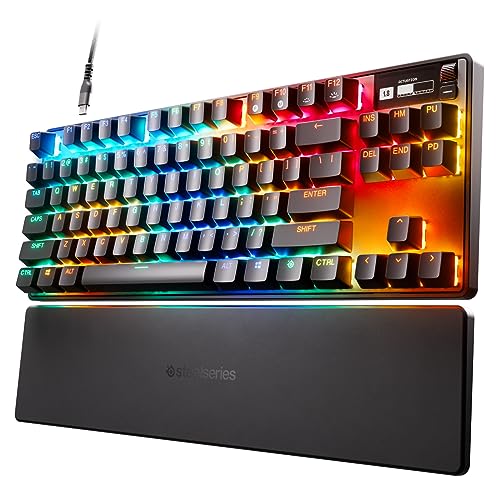
2. SteelSeries Apex Pro TKL, 2023 Edition (ASIN: B0BF64DN6H)
Runner-Up
2. SteelSeries Apex Pro TKL, 2023 Edition (ASIN: B0BF64DN6H)
The SteelSeries board takes the same magnetic idea and adds adjustability and feedback of its own. Its listing describes a HyperMagnetic gaming keyboard with adjustable actuation, an esports tenkeyless layout, an OLED screen, RGB lighting, PBT keycaps and a USB-C connection, in the 2023 edition of the line.
Adjustable actuation is the feature to understand here. Instead of one fixed actuation point for the whole board, you can set how far each key travels before it registers, so movement keys can be set light and fast while less timing-critical keys stay deeper and harder to trigger by accident. The small OLED screen shows settings and system information on the board itself, which reduces trips into software when you want to confirm or change a profile. As with the Logitech, the tenkeyless layout suits a gaming desk where mouse space matters more than a number pad.
Choose this board if per-key actuation tuning and on-board feedback appeal to you, and you are happy to spend time dialling in settings per game. If you would rather plug in and play with no tuning at all, a fixed mechanical board is the simpler path.
View it here: https://www.amazon.com/dp/B0BF64DN6H
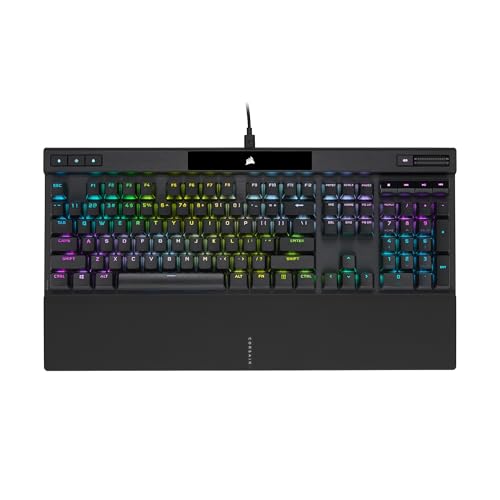
3. Corsair K70 RGB PRO, Cherry MX Red (ASIN: B09NCMHTSB)
3. Corsair K70 RGB PRO, Cherry MX Red (ASIN: B09NCMHTSB)
Corsair’s entry is the traditional full-size mechanical option, built for speed in a different way. Its listing states Cherry MX Red linear switches, SOCD handling, PBT double-shot keycaps, 8,000Hz hyper-polling, N-key rollover, anti-ghosting and a tournament switch, in a QWERTY layout for North America. The model number is CH-9109410-NA.
The Cherry MX Red switch is a long-established linear design: a smooth travel with no tactile bump, which suits rapid, repeated movement inputs and has a feel most PC players will recognise immediately. The 8,000Hz polling rate shortens the reporting interval between keyboard and PC beyond the standard rate, and the tournament switch is a practical touch for focused play, locking out distractions such as accidental Windows-key presses. The full-size layout keeps the number pad for bindings and everyday work, and the PBT double-shot caps should hold their texture and legends through years of use.
Choose this board if you want a full-size mechanical keyboard with a familiar linear switch, very high polling and no settings layer to learn beyond Corsair’s software for lighting and remapping. Players short on desk space should weigh the tenkeyless boards above it.
View it here: https://www.amazon.com/dp/B09NCMHTSB
4. Razer BlackWidow V4 X, Green Switches (ASIN: B0C8QTMK43)
4. Razer BlackWidow V4 X, Green Switches (ASIN: B0C8QTMK43)
Razer’s board is the pick for players who want extra keys to bind. Its listing states Green mechanical switches with a tactile and clicky action, six dedicated macro keys, Chroma RGB lighting, doubleshot ABS keycaps, a roller and media keys, and Snap Tap support, in a full-size layout.
The six macro keys down the side are the distinguishing feature. In a shooter with a deep set of commands — equipment, communication shortcuts, vehicle controls and class abilities across a long session — having physical keys reserved for them keeps those actions off the crowded movement cluster and reduces mis-presses. The Green switches give a pronounced tactile bump and an audible click, which players who like unmistakable confirmation of every press tend to enjoy; players who share a room, or who play late, should note that clicky switches are the loudest option in this guide. The roller and media keys handle volume and playback without leaving the game, and Chroma provides per-key lighting that can be matched to the rest of a Razer setup.
Choose this board if macro keys and a clicky, tactile feel are what you are missing from your current setup. If desk width is tight, remember that the macro column makes this the widest footprint here.
View it here: https://www.amazon.com/dp/B0C8QTMK43
Comparison Table
Product
ASIN
Switch type
Layout
Connection
Standout stated feature
Logitech G PRO X TKL Rapid
B0DJD163HT
Magnetic analog
Tenkeyless
Wired, detachable USB-C
Rapid trigger, 35g actuation
SteelSeries Apex Pro TKL (2023)
B0BF64DN6H
HyperMagnetic, adjustable actuation
Tenkeyless
Wired, USB-C
OLED screen, per-key actuation
Corsair K70 RGB PRO
B09NCMHTSB
Cherry MX Red, linear mechanical
Full-size
Wired
8,000Hz hyper-polling, tournament switch
Razer BlackWidow V4 X
B0C8QTMK43
Razer Green, tactile and clicky mechanical
Full-size
Wired
6 macro keys, roller and media keys
Frequently Asked Questions
Are magnetic keyboards better than mechanical keyboards for shooters?
They offer features mechanical switches cannot: adjustable actuation and rapid trigger, both of which can make movement inputs feel more responsive, as on the Logitech and SteelSeries boards here. Mechanical switches, like the Cherry MX Red and Razer Green boards here, have a fixed, predictable feel that many players prefer and need no tuning. Neither is automatically better; the choice is between adjustability and familiarity.
Does an 8,000Hz polling rate make a visible difference?
It shortens the time between a keypress and the PC receiving it, but the difference is measured in fractions of a millisecond beyond the standard 1,000Hz rate. It is a genuine specification, stated on the Corsair listing, and high-refresh players may value completing the input chain, but switch type and layout will change how a board feels far more noticeably.
Should I choose a tenkeyless or a full-size keyboard?
Tenkeyless boards free desk space and bring the mouse closer, which suits wide mouse movement in shooters. Full-size boards keep the number pad for extra bindings and everyday number entry. Two of each appear in this guide, so the decision can be made on desk and habits rather than on quality.
What is rapid trigger?
Rapid trigger is a magnetic-switch feature that resets a key as soon as it starts to rise, instead of at a fixed reset point, and lets it register again immediately when pressed back down. It makes repeated and reversed inputs — strafing left, then right, then left — follow your fingers more closely. The Logitech listing in this guide states the feature directly.
Do I need macro keys?
Only if you regularly use commands that do not fit comfortably on the standard cluster. The Razer board’s six dedicated macro keys suit players who bind equipment, communication or vehicle commands they do not want near the movement keys. If your bindings already fit, a board without the extra column saves desk width.
Will these keyboards work for everyday typing as well?
Yes. All four are standard QWERTY PC keyboards, and the full-size boards in particular double as ordinary work keyboards. The main everyday considerations are noise — the clicky Razer Green switches are the loudest here — and whether you want a number pad for spreadsheet or data-entry work.
Conclusion
For most shooter players, the Logitech G PRO X TKL Rapid is the cleanest recommendation in this guide: magnetic switches, rapid trigger, a compact tenkeyless body and PBT keycaps in a board designed with competitive players. The SteelSeries Apex Pro TKL is the alternative for players who want to tune actuation per key and see settings on the board’s own OLED screen. If you prefer a traditional mechanical feel, the Corsair K70 RGB PRO pairs a proven linear switch with very high polling in a full-size frame, while the Razer BlackWidow V4 X adds the macro keys and clicky feedback that command-heavy players ask for. Match the switch and the layout to your desk and your habits first; every board here already meets the baseline of fast, reliable input that a demanding shooter requires.
W
Wildshot Editorial Team
We compare specs, materials and verified owner reviews before a product earns a spot. Rankings are never paid.
Affiliate disclosure. As an Amazon Associate we earn from qualifying purchases at no extra cost to you. Prices accurate as of the date shown.
Find the best gaming desks for 3 monitors: the width, depth, weight capacity, and cable routing a triple-screen setup actually needs, plus a top pick built for three large screens.
Discover the best stationary bike workout setup: top indoor bikes, interval and endurance plans, and how to choose the right bike for home training today.
Find the best bike for bad roads today: durable hybrids with wide tires, suspension forks, and disc brakes built for potholes, gravel, and rough pavement.
Looking for the best 250 four stroke dirt bike? Compare five 250cc four-stroke trail and enduro bikes, their engines, gearboxes, and wheels before you buy.
Choosing a college laptop starts with GB. Compare laptops with 8GB and 16GB RAM and 256GB and 512GB SSD storage, and learn how much is enough for study.
Discover the best rechargeable OTC hearing aids for workplace conversations, with clear speech, noise reduction, battery life and Bluetooth calls for offices.
Compare the best narrow frame rollator walkers for tight doorways and small spaces, with widths, weight limits, seat sizes, wheels and folding compared.
Our eufy video doorbell s4 review 2026 covers the 3K panoramic camera, radar detection, OmniTrack AI tracking, local storage and wired setup in this guide.
Find the best bike tyre levers for road, gravel and mountain bikes. Compare plastic, steel-core and stainless sets, spoke hooks and rim-safe picks today.

 1. Logitech G PRO X TKL Rapid, Black (ASIN: B0DJD163HT)
 2. SteelSeries Apex Pro TKL, 2023 Edition (ASIN: B0BF64DN6H)
 3. Corsair K70 RGB PRO, Cherry MX Red (ASIN: B09NCMHTSB)
 4. Razer BlackWidow V4 X, Green Switches (ASIN: B0C8QTMK43)