Key takeaways
- Compare vertical mice, neon signs, computer speakers, and monitor stands to build a comfortable, well-lit desk setup for work, gaming, and creative spaces.
A desk setup works best when comfort and character support each other. A vertical mouse changes the angle of your hand during long sessions at the computer, while a neon sign adds color and personality to the wall behind your screen. Pair those two anchors with clear sound and a raised monitor, and an ordinary desk starts to feel like a space built for focused work and relaxed play.
This guide brings together five picks covering input comfort, ambient lighting, desktop audio, and screen height. You will find a right-hand vertical mouse with a wireless receiver, a blue poker-themed neon sign for game rooms, two computer speaker options for different desk sizes, and a two-tier wooden monitor stand. Each section explains what the item does, the key details to check before buying, and who it suits best.
As an Amazon Associate, we earn from qualifying purchases.
How to Choose
Start with the job each item needs to do at your desk. For a vertical mouse, handedness and grip angle matter most. A right-hand model is shaped for the right palm and fingers, so left-handed users should look for a left-hand design instead. Check how the mouse connects, since a small USB receiver gives a simple plug-and-play link, and confirm your computer has a free port. A smooth, medium-size mouse pad helps the sensor track evenly and gives a vertical mouse room to move.
For neon signs, think about theme, color, and placement. Measure the wall space where the sign will hang and check the listed size so the design reads clearly from your chair. Plan how it will be powered and where the cord will run, since a tidy cable path keeps the glow as the focal point. A plain wall behind the sign helps bright colors stand out.
Speakers and stands fill in the comfort side. Compact 2.0 speakers suit small desks and close listening, while a 2.1 system with a subwoofer adds deeper bass. Check the connection type your computer offers and leave enough desk depth for speakers on either side of the screen. A monitor stand should raise the screen to a comfortable height, and a two-tier design adds storage underneath. Measure your monitor base and desk width before buying.
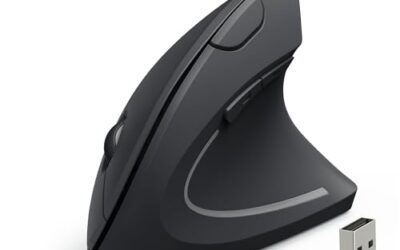
Anker 2.4G Wireless Ergonomic Mouse, Right Hand Vertical Mouse USB Receiver

A vertical mouse rotates your hand into a more natural handshake position, and this Anker model is built around that idea for right-handed users. Instead of a flat shell, the tall, sculpted body lets your fingers rest along the side with the palm facing inward. People who spend long hours on documents, browsing, or spreadsheets often look at this shape when a standard mouse starts to feel tiring by the end of the day.
The wireless connection uses a USB receiver, which keeps setup simple on most desktops and laptops. There is no cable to snag on a monitor stand or speaker wire. Because the mouse is designed for the right hand, the button layout follows that grip, so confirm your preferred hand before ordering. Give yourself a few days to adjust, since movement comes more from the arm and less from the wrist than with a flat mouse.
Specs
- Brand: Anker
- Product type: Wireless ergonomic vertical mouse
- Hand orientation: Right hand, as listed
- Connection: 2.4G wireless with USB receiver, as listed
- Intended use: Everyday computer work, browsing, and office tasks
- Fit note: Confirm right-hand preference and a free USB port before ordering
Who It Suits
This mouse suits right-handed desk workers who want a vertical grip without giving up wireless freedom. It fits home offices, study desks, and shared family computers. Left-handed users, or anyone who prefers a flat low-profile mouse for fast gaming, should look at designs shaped for their hand and play style instead.
Gamerneon Blue Poker Neon Sign Casino Playing Cards Neon Signs for Man Cave

Wall lighting sets the mood of a room faster than almost any other decor choice, and this Gamerneon sign leans into a casino theme with playing card artwork in blue. The design is made for man caves, game rooms, home bars, and streaming backdrops. Blue light pairs well with dark walls and wood tones, and it photographs cleanly for anyone who records videos or streams from their setup.
Placement shapes how good a neon sign looks in daily use. Hang it where it can be seen from your chair or camera angle, but keep it clear of direct sunlight that can wash out the glow. Check the listed size against your wall so the playing card details stay readable from across the room. Plan the power cord route before hanging, ideally down a corner or behind furniture, so the sign appears to float on the wall.
Specs
- Brand: gamerneon
- Product type: Neon sign, casino playing cards design
- Color: Blue, as listed
- Theme: Poker and casino playing cards
- Intended use: Man cave, game room, bar area, or desk backdrop decor
- Placement note: Confirm wall space and cord routing before hanging
Who It Suits
This sign suits poker fans, card players, and anyone building a game-room atmosphere around a desk or bar corner. It works well as a backdrop for streams and casual video calls. If your space calls for soft, neutral lighting, a themed blue sign may feel too bold, and a plain warm-white design would fit better.
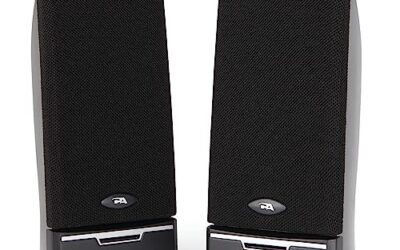
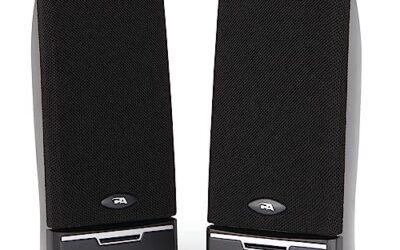
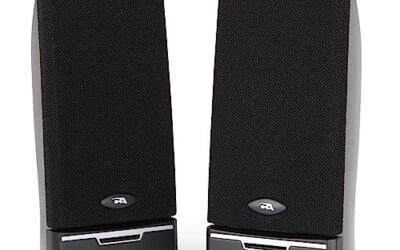
Cyber Acoustics CA-2014 2.0 Computer Speakers, 4W, Stereo Sound

Built-in monitor speakers often sound thin, and a compact 2.0 speaker pair is the simplest step up for everyday listening. This Cyber Acoustics CA-2014 set is listed with 4W of stereo sound, aimed at close-range desk use rather than filling a large room. Two separate speakers let you place one on each side of your monitor, giving music, videos, and calls a wider stereo image than a single small driver.
Small speakers earn their keep on crowded desks. They take little footprint next to a monitor stand and leave room for a vertical mouse to move freely. For work calls, casual music, and background video, clarity at moderate volume matters more than deep bass. Check the input connection your computer provides and confirm the cable length reaches comfortably. Keeping the speakers at ear height helps voices sound clear without turning the volume up.
Specs
- Brand: Cyber Acoustics
- Product type: 2.0 computer speakers
- Model: CA-2014, as listed
- Output: 4W, as listed
- Sound: Stereo, as listed
- Intended use: Desk listening for music, video, and calls
- Fit note: Confirm input connection and desk space on both sides of the monitor
Who It Suits
These speakers suit students, home office workers, and anyone with a compact desk who wants clearer sound than built-in speakers provide. They are a practical pick for shared spaces where moderate volume is the norm. Listeners who want strong bass for movies and games should consider a 2.1 system with a subwoofer instead.
GOgroove BassPULSE 2.1 Computer Speakers with Blue LED Glow Lights and Powered Subwoofer
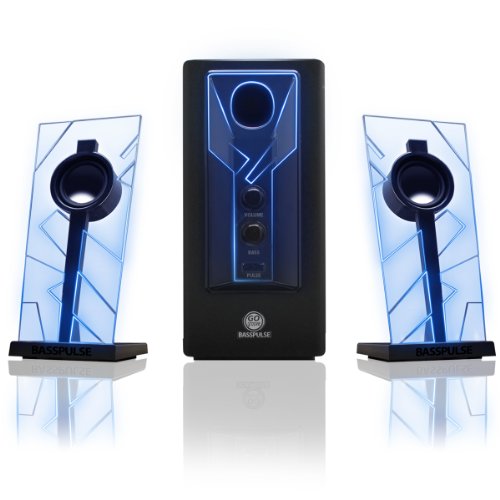
When desk audio needs more weight, a 2.1 system adds a dedicated subwoofer for the low end, and this GOgroove BassPULSE set is built around that layout. The powered subwoofer sits under or beside the desk and gives music, game effects, and movie scenes a fuller foundation than small speakers manage alone. Blue LED glow lights also tie in nicely with a neon sign or other blue accent lighting, making the setup feel coordinated after dark.
Placement matters with a subwoofer. Give it a spot on the floor or a sturdy shelf where it will not rattle, and keep it away from walls that can make bass sound boomy. The satellite speakers belong on either side of the monitor at roughly ear level. This system asks for more space than a compact 2.0 pair, so measure your area first and plan cable runs so the glow, not the wiring, draws the eye.
Specs
- Brand: GOgroove
- Product type: 2.1 computer speakers with powered subwoofer
- Series: BassPULSE, as listed
- Lighting: Blue LED glow lights, as listed
- Intended use: Music, gaming, and movie sound at a desk
- Fit note: Confirm desk space for satellites and floor space for the subwoofer
Who It Suits
This system suits gamers, movie watchers, and music listeners who want deeper bass and a light-accented look at their desk. It pairs naturally with a neon sign backdrop and a raised monitor. Anyone with a very small desk or a need for near-silent listening may prefer a compact 2.0 pair or headphones instead.
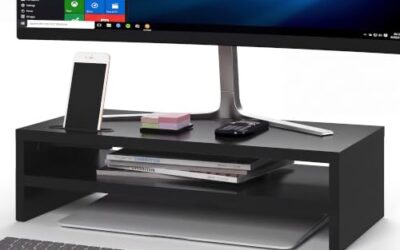
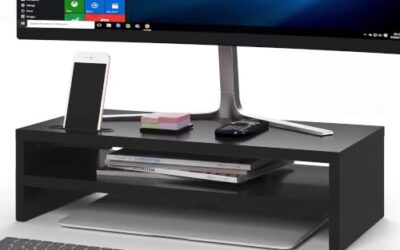
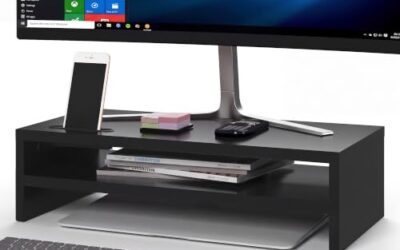
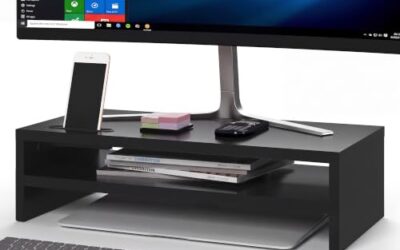
BONTEC Wood Monitor Stand Riser, 2-Tier Desktop Organizer

Raising your monitor to a comfortable height is one of the easiest ergonomic upgrades a desk can get, and this BONTEC wooden stand does it with a two-tier design that doubles as storage. The top tier holds the monitor, while the lower tier creates a shelf for a keyboard, notebooks, or small accessories. A wood finish brings warmth to a setup that might otherwise be all plastic and metal, and it pairs well with both office and game-room decor.
Before buying, measure your monitor base to confirm it sits fully on the top tier, and check the stand width against your desk so speakers can still flank the screen. Think about what you will store below, since a keyboard tucked away at night frees the desk. Placed well, the riser lifts the screen and gives a vertical mouse and speakers room to work without crowding.
Specs
- Brand: BONTEC
- Product type: Wood monitor stand riser, desktop organizer
- Design: 2-tier, as listed
- Material: Wood, as listed
- Intended use: Raising a monitor and organizing desktop items
- Fit note: Confirm monitor base size and desk width before ordering
Who It Suits
This stand suits home office workers, students, and gamers who want better screen height plus built-in storage. It fits wooden desks and warm-toned rooms where a matching finish matters. Very large monitors with wide bases, or desks with little depth, should be measured carefully, since a smaller riser or a monitor arm may suit those spaces better.
FAQ
How long does it take to get used to a vertical mouse?
Most people need a few days of regular use before a vertical grip feels natural. The movement shifts from the wrist to the arm, so pointing may feel slower at first. Start with everyday tasks like browsing and documents, and give the new angle a fair trial. If discomfort persists, check your chair height and desk setup too, since posture affects comfort as much as the mouse shape.
Where should a neon sign hang in a desk setup?
Hang the sign on the wall behind or beside your monitor, where it is visible from your chair and from a camera if you stream or record. Keep it out of direct sunlight so the glow stays vivid, and route the power cord down a corner or behind furniture.
Should I choose 2.0 or 2.1 computer speakers?
Choose 2.0 speakers for compact desks, calls, and casual listening at moderate volume. Choose a 2.1 system when music, movies, and games need deeper bass and you have floor space for the subwoofer. Either way, place the speakers on both sides of the monitor, and confirm the connection type your computer offers before ordering.
How do I know if a two-tier monitor stand fits my desk?
Measure your monitor base and compare it with the top tier size listed by the maker, then check the stand width against your desk. Plan what will go on the lower tier, such as a keyboard or notebooks, and confirm the height still lets you sit with the screen at a comfortable viewing level.
Final Verdict
Together, these five picks cover the layers that make a desk setup feel complete. The Anker vertical mouse brings a more natural hand position to long work sessions, the Gamerneon blue poker sign adds game-room character and ambient glow, the Cyber Acoustics CA-2014 speakers give compact desks clear stereo sound, the GOgroove BassPULSE 2.1 system adds subwoofer depth with matching blue lighting, and the BONTEC two-tier wooden stand raises the screen while organizing the surface. Start with the piece that solves your most pressing need, then add the others as your setup takes shape. Checking hand orientation, wall space, and measurements before you buy will help each item earn its place.
Product and ASIN Reference
| Product Name | ASIN |
|---|---|
| Anker 2.4G Wireless Ergonomic Mouse, Right Hand Vertical Mouse USB Receiver | B00BIFNTMC |
| Gamerneon Blue Poker Neon Sign Casino Playing Cards Neon Signs for Man Cave | B09TKHRPYS |
| Cyber Acoustics CA-2014 2.0 Computer Speakers, 4W, Stereo Sound | B00008MN45 |
| GOgroove BassPULSE 2.1 Computer Speakers with Blue LED Glow Lights and Powered Subwoofer | B004ALYGI2 |
| BONTEC Wood Monitor Stand Riser, 2-Tier Desktop Organizer | B01M5K9ZTL |