We independently review everything we recommend. When you buy through our links, we may earn a commission. As an Amazon Associate we earn from qualifying purchases.
Best Laptops for Physics: Powerful Picks for Computation, Simulation and Data Analysis
The best laptops for physics combine strong multi-core CPUs, ample RAM and sharp displays for simulation, coding and data analysis. Compare four top picks.
The best laptops for physics combine strong multi-core CPUs, ample RAM and sharp displays for simulation, coding and data analysis. Compare four top picks.
Introduction
Physics work asks more of a laptop than everyday browsing or word processing. A physics student or researcher might run Python notebooks and data-analysis scripts in the morning, compile LaTeX documents and plot experimental results at midday, and run a numerical simulation or a Monte Carlo job in the evening. Each of those tasks leans on the processor, the memory, and the display in different ways, and a machine that handles one comfortably can struggle with another. The best laptops for physics therefore balance raw compute power with enough memory to hold large datasets, a screen that renders dense plots and code clearly, and a battery that lasts through a full day of lectures and lab sessions.
This guide compares four laptops suited to physics work, from a light and efficient ultraportable to a high-performance workstation-class machine. Every model below is a current laptop sold on Amazon US, with specifications from the manufacturer and retailer listings. The focus is on what matters for physics: multi-core CPU performance for parallel computation, memory headroom for simulations and data analysis, storage speed for large datasets, display quality for reading plots and code, and portability for carrying the machine between lecture halls, labs, and the library.
Most physics software benefits directly from a faster processor. Python with NumPy and SciPy, MATLAB, Mathematica, and compiled code in C++ or Fortran all run faster on a modern multi-core CPU, and parallel workloads such as parameter sweeps and Monte Carlo simulations scale with core count. Look for a current-generation processor with at least eight cores: Apple M4 chips, Intel Core Ultra 7 processors, and their equivalents all qualify. Clock speed matters for single-threaded tasks such as symbolic computation, while core count matters for parallel jobs.
Memory: 16GB is the floor, 32GB is comfortable
Memory is often the first bottleneck in physics work. Loading a large dataset, running a simulation with a fine grid, or keeping a browser, a notebook environment, and a plotting tool open at the same time can consume memory quickly. Sixteen gigabytes is a workable minimum for undergraduate coursework and lighter analysis, but 32GB gives real headroom for graduate research, large arrays, and virtual machines. Because memory is soldered in most thin laptops and cannot be upgraded later, choosing enough memory at purchase time is one of the most important decisions in this guide.
Storage: fast SSD space for datasets and code
Physics datasets, simulation outputs, and software environments grow quickly. A 512GB solid-state drive is a sensible minimum, and 1TB or more is better if you store raw data locally. NVMe SSDs load large files and launch applications far faster than older storage, which matters when you reopen a multi-gigabyte dataset or restart a notebook server.
Display: sharp text and accurate colour for plots
You will spend hours reading code, equations, and plots, so display quality is not a luxury. A high-resolution screen keeps small text legible, and good brightness helps in bright lecture halls. Colour accuracy matters when you interpret heat maps, contour plots, and multi-series graphs: a display with wide colour support renders those distinctions faithfully. A 14-inch class screen is a good compromise between workspace and portability.
Graphics: integrated is enough for most, discrete helps some
Most physics computation runs on the CPU, and modern integrated graphics handle plotting, visualisation, and everyday use without difficulty. A discrete GPU becomes valuable for GPU-accelerated simulation, machine learning, and heavy visualisation work. If your workflow includes those tools, check that the laptop supports the GPU libraries your software requires before buying.
Operating system and software compatibility
Physics software runs on all three major operating systems, but the details differ. macOS offers a Unix-based environment that suits Python, Julia, and command-line tools, while Windows offers the broadest commercial software support, including some instrumentation and lab control packages. Linux is common in research computing and runs natively on many Windows laptops, either as the main system or alongside Windows. Check that your essential packages are supported on the system you choose.
A physics laptop travels: lectures, labs, the library, conferences, and field work. Weight under three pounds and a full day of battery life make a real difference over a semester. A comfortable keyboard matters for long coding and writing sessions, and good thermals keep the machine quiet in a lecture hall while sustaining performance during a long computation.## Apple MacBook Air 13-inch with M4 chip
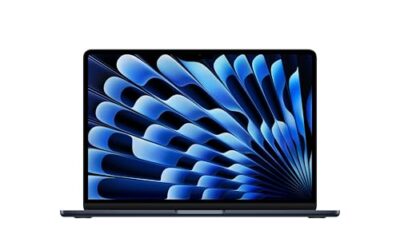
The MacBook Air with the M4 chip is the lightest machine in this guide and the easiest to carry all day, which makes it a strong choice for physics students who move between classes, labs, and study spaces. The Apple M4 chip pairs a 10-core CPU with a 10-core GPU and a 16-core Neural Engine, and the 16GB of unified memory keeps notebooks, browsers, and plotting tools running side by side. Storage is a 256GB SSD in this configuration, so students working with large datasets should plan on external storage or a higher-capacity configuration.The 13.6-inch Liquid Retina display renders at 2560 by 1664 pixels with 500 nits of brightness, support for one billion colours, and wide colour (P3) coverage. That combination keeps dense code, small equation text, and multi-coloured plots legible, and the colour accuracy helps when interpreting heat maps and contour plots. The machine weighs 2.73 pounds and measures 0.44 inches thick, and Apple states up to 18 hours of battery life. A 12MP Center Stage camera and Touch ID round out a package built for portability.
For physics work, the MacBook Air handles Python data analysis, LaTeX typesetting, symbolic computation, and moderate simulation comfortably. Its fanless design stays silent in lectures, and the Unix-based macOS environment works well with Python, Julia, and command-line tools commonly used in physics. Limitations are real: the base storage is modest, the memory cannot be upgraded after purchase, and heavy GPU-accelerated simulation is better served by a machine with a discrete GPU.
Pros:
– Very light and thin at 2.73 pounds, easy to carry all day
– M4 chip with 10-core CPU handles Python, MATLAB-style analysis, and LaTeX smoothly
– Sharp, bright, colour-accurate 13.6-inch Liquid Retina display
– Long battery life, stated at up to 18 hours
– Silent fanless design for lectures and libraries
Cons:
– Base 256GB storage is modest for large datasets
– Memory is fixed at purchase and cannot be upgraded later
– No discrete GPU for heavy GPU-accelerated simulation
– Limited port selection compared with larger workstation laptops
The 14-inch MacBook Pro with the M4 chip steps up from the Air with a brighter, more capable display, active cooling for sustained workloads, and a more complete set of ports, making it the better choice for physics work that runs long and hot. It uses the same Apple M4 chip with a 10-core CPU and 10-core GPU, paired with 16GB of unified memory and a 512GB SSD in this configuration. The extra storage over the base Air configuration leaves more room for datasets, simulation outputs, and software environments.
The 14.2-inch Liquid Retina XDR display is the standout feature: a native resolution of 3024 by 1964 pixels, up to 1600 nits of peak brightness, up to 1000 nits of sustained brightness, and a one-million-to-one contrast ratio. Plots, images, and data visualisations render with exceptional clarity and dynamic range, and the screen stays readable in bright rooms. The Pro also sustains performance under load thanks to its cooling system, so a long simulation or a large batch of computations does not slow down as the machine warms up.
The MacBook Pro suits graduate students and researchers who run longer computations, work with larger datasets, and spend full days at a desk or in the lab. The macOS environment supports the usual physics toolchains, and the machine handles code compilation, numerical work, and document preparation with ease. Its trade-offs are weight and size compared with the Air, and the same platform limits: memory is fixed at purchase, and GPU-accelerated codes that require a specific discrete GPU ecosystem may need a different machine.Pros:
– Outstanding 14.2-inch Liquid Retina XDR display with very high brightness and contrast
– Active cooling sustains performance during long computations
– 512GB SSD gives more room for datasets and simulation output
– Strong all-day battery life for lab and library sessions
– Good port selection for external monitors and lab equipment
Cons:
– Heavier and thicker than the MacBook Air
– Memory cannot be upgraded after purchase
– No discrete GPU option in this configuration
– Higher cost tier than the Air for similar CPU performance
Lenovo ThinkPad X1 Carbon Gen 13 Aura Edition
The ThinkPad X1 Carbon Gen 13 Aura Edition is the Windows flagship in this guide, and it is the pick for physics users who want a premium Windows or Linux machine in an exceptionally light chassis. It runs an Intel Core Ultra 7 258V processor with 32GB of LPDDR5X memory and a 2TB Gen 5 SSD, a combination that gives generous headroom for large datasets, virtual machines, and memory-hungry simulations. Windows 11 Pro is installed, and the ThinkPad line is well supported for Linux installation.
The 14-inch display uses OLED technology at 2.8K resolution (2880 by 1800 pixels), which delivers deep blacks and vivid colour that help when inspecting images, heat maps, and detailed plots. The laptop weighs 2.4 pounds, making it one of the lightest 14-inch machines available, and it includes Wi-Fi 7, a 1080p infrared camera, and the classic ThinkPad keyboard, which is widely regarded as one of the most comfortable laptop keyboards for long writing and coding sessions. Two Thunderbolt 4 ports, USB-A, and HDMI 2.1 cover connections to external monitors, projectors, and lab instruments.For physics, the X1 Carbon excels at portability plus headroom: 32GB of memory and 2TB of fast storage handle large analysis jobs, while the light chassis makes it easy to carry to lectures and conferences. The Intel Arc integrated graphics handle visualisation and plotting well, though heavy GPU compute is not its strength. The OLED display is beautiful for image work but can draw more power on bright content, so battery life varies with workload.
Pros:
– 32GB of memory and a 2TB SSD give generous headroom for large datasets
– Exceptionally light at 2.4 pounds for a 14-inch laptop
– Sharp 2.8K OLED display with rich colour for plots and images
– Excellent keyboard for long coding and writing sessions
– Wi-Fi 7, Thunderbolt 4, and HDMI for lab and presentation setups
Cons:
– Integrated graphics only, so heavy GPU-accelerated simulation needs another machine
– OLED display can use more power on bright content
– Premium pricing tier for the high-memory, high-storage configuration
– Memory is soldered and cannot be upgraded later
The Dell 14 Premium, sold as the XPS 14 and listed under model DA14250, is the most visually capable Windows laptop in this guide, pairing a high-resolution OLED touch display with a powerful Intel processor and generous memory. It runs an Intel Core Ultra 7 255H processor with 16 cores and speeds up to 5.1GHz, 32GB of LPDDR5X memory, and a 1TB SSD. Windows 11 Pro is installed.
The 14.5-inch touch display renders at 3200 by 2000 pixels with a 48 to 120Hz refresh rate, 400 nits of brightness, and full DCI-P3 colour coverage. The high resolution keeps dense plots and code crisp, the touch input helps when presenting or annotating figures, and the wide colour support renders scientific visualisations faithfully. Intel Arc integrated graphics drive the display and handle plotting and visualisation smoothly. The machine includes two Thunderbolt 4 ports, a backlit keyboard, and a fingerprint reader, and its aluminium chassis gives it a solid, premium feel.For physics work, the Dell 14 Premium is a strong desk-and-lab machine that still travels well: the large, sharp OLED panel is excellent for data visualisation and image inspection, and 32GB of memory plus a 1TB SSD handle substantial analysis jobs. The touch screen is a genuine advantage for presentations and interactive plots. Its limitations are shared with the other thin laptops here: integrated graphics rather than a discrete GPU for heavy accelerated compute, and memory that is fixed at purchase.
Pros:
– Large, sharp 14.5-inch 3.2K OLED touch display with wide colour coverage
– 16-core Intel Core Ultra 7 255H processor for parallel computation
– 32GB of memory and 1TB SSD for large datasets and analysis tools
– Touch input useful for presentations and interactive plots
– Premium aluminium build with fingerprint reader and Thunderbolt 4
Cons:
– Integrated graphics only, limiting heavy GPU-accelerated simulation
– Memory is soldered and cannot be upgraded later
– Heavier than the ultraportable picks in this guide
– OLED touch panel adds cost compared with a standard display
Which Laptop Fits Your Physics Work
Students who carry a laptop all day and mainly run coursework, Python notebooks, LaTeX, and lighter analysis will get the most from the MacBook Air: it is light, silent, and capable, with a display that makes long reading sessions comfortable. Researchers who run longer computations and want a brighter display and sustained performance should look at the MacBook Pro, which keeps the same efficient platform and adds cooling and a far better screen.
Windows and Linux users have two strong options. The ThinkPad X1 Carbon is the lightest machine here and the best traveller, with 32GB of memory and a 2TB SSD that remove storage and memory worries for large projects, plus a keyboard built for long writing sessions. The Dell 14 Premium offers the largest and sharpest display of the four, with touch input that suits presentations and interactive visualisation, and a 16-core processor that handles parallel work well. Both are excellent; the ThinkPad wins on portability, the Dell on screen size and visual workspace.
Frequently Asked Questions
How much RAM do I need for physics work?
Sixteen gigabytes is a workable minimum for undergraduate coursework, Python data analysis, and LaTeX. Thirty-two gigabytes is the safer choice for graduate research, large datasets, and simulations with fine grids. Because memory is soldered in these laptops, choose the larger amount at purchase time if your budget allows.### Is a Mac or a Windows laptop better for physics?
Both work well. macOS offers a Unix-based environment that suits Python, Julia, and command-line tools, while Windows offers broader support for commercial and lab-instrumentation software and runs Linux readily. Choose based on the software your courses or research group use, not on brand alone.### Do I need a discrete GPU for physics?
Most physics computation runs on the CPU, and integrated graphics handle plotting and visualisation without difficulty. A discrete GPU matters mainly for GPU-accelerated simulation, machine learning, and heavy 3D visualisation. If your codes use GPU acceleration, confirm which GPU libraries they require before buying.### Is a 13-inch or 14-inch screen enough for physics work?
Yes for most work, especially with a high-resolution panel. Dense code, equations, and plots stay legible on the 13.6-inch and 14-inch displays in this guide. For extended desk work, all four laptops drive an external monitor.### Can these laptops run Python, MATLAB, and Mathematica?
Yes. All four laptops run the standard physics software stack, including Python with NumPy and SciPy, MATLAB, Mathematica, Julia, and LaTeX distributions. Check the system requirements of any specialised simulation or data-acquisition package you rely on, particularly for operating-system support.### How important is battery life for a physics laptop?
Very important if you move between lectures, labs, and the library. All four are designed for all-day use, but actual battery life depends on workload: heavy computation drains a battery far faster than writing and reading. Carry a charger for simulation-heavy days.## Conclusion
The best laptops for physics pair a modern multi-core processor with enough memory, fast storage, and a sharp display, and all four picks in this guide meet that standard in different ways. The MacBook Air is the lightest and most portable choice for coursework and analysis, the MacBook Pro adds a superb display and sustained performance for longer jobs, the ThinkPad X1 Carbon combines light weight with generous memory and storage for Windows and Linux research, and the Dell 14 Premium offers the largest, sharpest screen for visualisation-heavy work. Decide how much memory and storage your datasets need, confirm your essential software runs on your chosen system, and pick the machine that matches the way you work.
Disclosure: As an Amazon Associate, we earn from qualifying purchases.
W
Wildshot Editorial Team
We compare specs, materials and verified owner reviews before a product earns a spot. Rankings are never paid.
Affiliate disclosure. As an Amazon Associate we earn from qualifying purchases at no extra cost to you. Prices accurate as of the date shown.
The best mirrorless Micro Four Thirds cameras offer compact bodies, fast autofocus and a huge shared lens range. Compare four current OM SYSTEM and Lumix picks.
The best online sheet sets come down to fibre and weave. Four verified sets in bamboo, sateen and organic cotton compared, plus checks before you order.
Hotels with big bathtubs hide in suites, ryokan and spa resorts. How to tell a true soaking tub from a standard one, and how to verify before you book.
The best floor rugs for dogs are low-pile, non-slip and machine washable. Three verified picks compared by size, pile and backing for real dog households.
Looking for the best wireless cell phone chargers? Compare Qi2 15W magnetic pads, 3-in-1 stands and travel chargers for iPhone and Android before you buy.
Best Samsubg Galaxy S5 Battery Extenders compared: extended batteries and battery cases for the Galaxy S5, checked for capacity, bulk, fit and water resistance.
Find the best selling sound cards for gaming PC use, from budget PCIe 5.1 cards to high-resolution USB and premium internal models, with specs and fit guidance.

 Portability, battery, and keyboard
 Apple MacBook Pro 14-inch with M4 chip
 Dell 14 Premium (XPS 14) DA14250