We independently review everything we recommend. When you buy through our links, we may earn a commission. As an Amazon Associate we earn from qualifying purchases.
5 Best Selling Sound Cards for Gaming PC (November 2026)
Find the best selling sound cards for gaming PC use, from budget PCIe 5.1 cards to high-resolution USB and premium internal models, with specs and fit guidance.
Find the best selling sound cards for gaming PC use, from budget PCIe 5.1 cards to high-resolution USB and premium internal models, with specs and fit guidance.
A dedicated sound card still makes sense when onboard audio sounds flat, noisy, or thin through headphones and speakers you already like. The real decision is not whether a separate card helps, but which form and which set of outputs match the machine and the listening setup you already own. A card that fits a desktop PCIe slot is useless for a laptop, and a high-resolution card is wasted if its outputs do not match your speakers.
This guide is for PC gamers, home theatre listeners, and headphone users who want cleaner sound without replacing their whole setup. The picks below are drawn from product names and specifications shown on their Amazon product pages, covering internal PCIe cards and one external USB card, so you can compare connection type, surround channels, resolution, and headphone support before choosing.
Quick Picks
As an Amazon Associate we earn from qualifying purchases
Product
Best for
Key spec from title
Creative Sound Blaster Audigy FX PCIe 5.1
Budget desktop 5.1 surround
PCIe 5.1 internal sound card with high performance headphone amp
Creative Sound Blaster Audigy PCIe RX 7.1
Desktop 7.1 speaker setups
PCIe 7.1 sound card with high performance headphone amp
Creative Sound Blaster Z
Gaming and entertainment on a desktop
PCIe gaming sound card, 116 dB SNR, 24-bit 192 kHz
Hi-res 130 dB 32-bit 384 kHz external USB sound card with Xamp headphone amp
How to Choose
Internal PCIe or external USB
Start with the machine, not the card. An internal PCIe card needs a free PCIe x1 or PCIe x4 slot, a desktop case with room for the card and its bracket, and a power supply and motherboard layout that leave the slot clear. It stays inside the case, so it suits a desktop that rarely moves. An external USB card needs only a free USB port, so it suits a laptop, a small desktop with no free slot, or a setup shared between a PC and a console. USB cards are easier to move and to unplug when something goes wrong, while PCIe cards keep cables inside the case and leave USB ports free for other devices.
Surround channels and headphone support
Match the channel count to the speakers you actually use. A 5.1 card covers front, rear, centre, and subwoofer outputs for a typical surround speaker set, while a 7.1 card adds side channels for a larger room or a fuller speaker layout. If you mainly use headphones, the channel count matters less than the headphone amplifier. Check the supported headphone impedance in the specifications, because a card built for standard headsets may struggle with high-impedance studio headphones. Also check whether the headphone output shares a jack with the front speaker output, since that affects how easily you can switch between speakers and headphones.
Resolution, signal-to-noise ratio, and the DAC
Resolution and signal-to-noise ratio describe how cleanly a card can convert digital audio into sound you can hear. Higher playback resolution, such as 24-bit 192 kHz or 32-bit 384 kHz, gives the card more detail to work with, while a higher signal-to-noise ratio means less background hiss at normal listening levels. The DAC chip matters too, because it does the conversion itself, and the product titles in this guide name the DAC family on the higher-end models. Treat these numbers as a comparison tool rather than a promise about every game or recording, since the source file, the speakers, and the room all shape the final result.
Software, drivers, and connections
A sound card is only as useful as its software and its ports. Check the control software named on the product page, because it controls surround processing, equaliser settings, microphone input, and profile switching. Check operating system support before buying, since older cards may list older Windows versions and newer cards may need a current driver download. Then count the connections: line-in, microphone-in, front, rear, centre and subwoofer outputs, optical output, and any separate headphone jack. A card with the right ports avoids adapters, splitter cables, and constant plugging and unplugging.
The 5 Best Options
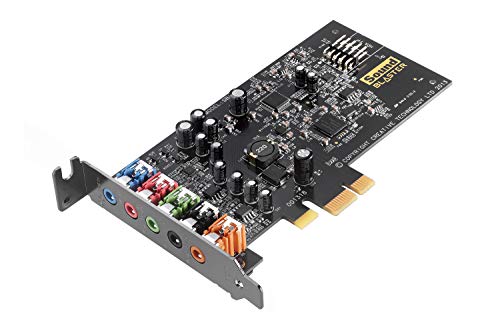
Creative Sound Blaster Audigy FX PCIe 5.1
Top Pick
Creative Sound Blaster Audigy FX PCIe 5.1
Best for: Desktop owners adding 5.1 surround sound to a speaker set on a modest budget.
PCIe x1 internal sound card with 5.1 surround sound
The Audigy FX is the straightforward choice for a desktop owner who wants 5.1 surround sound from a PCIe slot without moving to a larger or more complex card. Its half-height design suits many desktop cases, and its SBX Pro Studio processing and dedicated control panel give you a clear way to adjust surround sound for games, films, and music. It is aimed at listeners who want a clear step up from basic motherboard audio for a speaker set they already own.
Watch out for: Check that you have a free PCIe x1 slot and a suitable bracket height for your case before ordering.
Creative Sound Blaster Audigy PCIe RX 7.1
Runner-Up
Creative Sound Blaster Audigy PCIe RX 7.1
Best for: Desktop users with 7.1 speakers who also want a strong headphone output from the same card.
PCI Express x1 internal sound card with 7.1 channel output
The Audigy RX suits a desktop listener who already has, or plans to build, a 7.1 speaker setup and wants the extra side channels that a 5.1 card cannot provide. Its EAX reverb processing and Audigy Rx Control Panel are built around films, games, and music played through multiple speakers, while the 600 ohm headphone amplifier keeps the same card useful when you switch to headphones late at night. It is a practical middle step between a basic 5.1 card and a high-resolution premium card.
Watch out for: A 7.1 setup needs the matching speaker layout and cables, so confirm your speaker connections before choosing this over a 5.1 card.
Creative Sound Blaster Z
Creative Sound Blaster Z
Best for: Desktop gamers and film watchers who want cleaner sound for both speakers and headphones.
The Sound Blaster Z is built for gaming and entertainment on a desktop, with a Sound Core3D audio processor, a beamforming microphone in the box, and SBX Pro Studio processing for games, films, and music. Its 116 dB signal-to-noise ratio and 600 ohm headphone amplifier put it a step above the basic Audigy cards for listeners who use both speakers and demanding headphones. It fits a desktop owner who wants one card for play, films, and everyday listening.
Watch out for: This is a 5.1 card, so it does not add the side channels of a 7.1 speaker layout.
Creative Sound Blaster AE-7
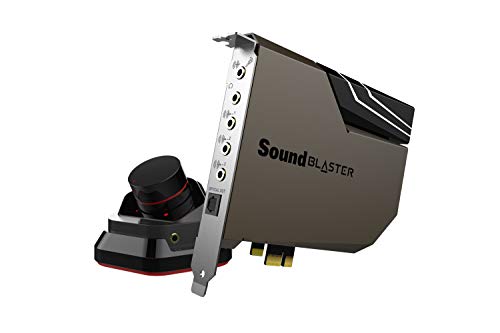
Creative Sound Blaster AE-7
Best for: Desktop listeners who want high-resolution playback, a strong headphone amplifier, and desk-level controls.
PCI Express x4 internal sound card with quad-core audio processor
ESS SABRE-class 9018 DAC with 127 dB DNR
Up to 32-bit 384 kHz PCM playback and DSD64 playback
Xamp discrete headphone bi-amp, supporting headphones up to 600 ohm
The AE-7 is the premium internal pick in this guide, built around an ESS SABRE-class 9018 DAC, a quad-core processor for audio processing, and a discrete Xamp headphone bi-amp. Its Audio Control Module puts volume, microphone, and headphone connections within reach on the desk, which suits a listener who changes volume and inputs often. With 5.1 discrete surround for speakers and 7.1 virtual surround for speakers and headphones, it covers both speaker and headphone listening from one card.
Watch out for: It needs a PCIe x4 slot and space for the Audio Control Module on the desk, so check slot type and desk space first.
Creative Sound BlasterX G6
Creative Sound BlasterX G6
Best for: Laptop owners and gamers who need a portable USB sound card for PC and console play.
External USB sound card with Xamp discrete headphone amplifier
130 dB dynamic range with 32-bit 384 kHz DAC
7.1 virtual surround sound with Dolby Digital decoding
Laptop owners and gamers who need a portable USB sound card for PC and console play.
Watch out for
As an external device it uses a USB port and desk space, and its surround sound for speakers is virtual rather than discrete multi-channel analogue output.
The Sound BlasterX G6 is the external option in this guide, connecting over USB instead of sitting inside the case. That makes it the natural pick for a laptop, a desktop with no free PCIe slot, or a setup shared between a PC and a console. Its 130 dB dynamic range, 32-bit 384 kHz DAC, Xamp discrete headphone amplifier, Dolby Digital decoding, and virtual 7.1 surround sound are aimed at gamers who want detailed directional audio and clear voice chat through headphones.
Watch out for: As an external device it uses a USB port and desk space, and its surround sound for speakers is virtual rather than discrete multi-channel analogue output.
Which One Fits Your Situation
You have a desktop with a free PCIe slot and a 5.1 speaker set
Choose the Creative Sound Blaster Audigy FX PCIe 5.1. It matches the channel count of a standard 5.1 speaker set, adds a 600 ohm headphone amplifier for evenings when speakers are not practical, and keeps the upgrade inside the case. Check the bracket height for your case, then use the control panel to set the speaker layout once and leave it alone.
You already own 7.1 speakers
Choose the Creative Sound Blaster Audigy PCIe RX 7.1. It is the only card in this guide with discrete 7.1 analogue output at this level, so it uses the side channels your speakers already provide. Its 106 dB signal-to-noise ratio and 600 ohm headphone amplifier also keep it useful for headphone listening when the full speaker set is switched off.
You listen mainly through demanding headphones
Choose the Creative Sound Blaster AE-7 for a desktop, or the Creative Sound BlasterX G6 if you need USB. The AE-7 pairs its ESS SABRE-class DAC with a discrete Xamp bi-amp and a desk-level Audio Control Module, while the G6 pairs a 130 dB DAC with its own Xamp amplifier in a portable USB unit. Both are built around headphone listening rather than treating it as an afterthought.
You use a laptop or share audio between PC and console
Choose the Creative Sound BlasterX G6. It needs no internal slot and no case opening, so it works on a laptop and moves easily between machines. Its USB, optical, and line-in connections, plus sidetone and profile controls, suit gaming sessions where voice chat and game audio need quick balancing without opening software menus.
Common Mistakes
Buying an internal PCIe card for a laptop or a desktop with no free PCIe slot, then finding there is nowhere to install it.
Choosing a 7.1 card for a stereo or 5.1 speaker set, and paying for channels the speakers cannot use.
Ignoring headphone impedance, so a card that sounds fine on standard headsets struggles with high-impedance studio headphones.
Skipping the driver and operating system check, and then finding the control software does not install cleanly on the current system.
Judging a card only by its headline resolution, without checking its outputs, its headphone amplifier, and whether its surround sound is discrete or virtual.
Frequently Asked Questions
Do I need a sound card if my motherboard already has audio?
Not always. Motherboard audio is enough for basic speakers and standard headsets, but a dedicated card can help when onboard sound is noisy, when you want discrete 5.1 or 7.1 speaker outputs, or when your headphones need a stronger amplifier. Start by listing what is missing from your current setup, then match a card to that gap rather than buying on specifications alone.
Should I choose an internal PCIe sound card or an external USB sound card?
Choose internal PCIe for a desktop with a free slot, since it keeps cables inside the case and leaves USB ports free. Choose external USB for a laptop, a small desktop with no free slot, or a setup shared between devices. USB cards are easier to move and to remove for troubleshooting, while PCIe cards suit a fixed desktop that rarely changes.
What does signal-to-noise ratio tell me about a sound card?
Signal-to-noise ratio describes how much of the output is wanted sound compared with background noise from the card itself. A higher figure, such as 116 dB or 127 dB, points to cleaner output at normal listening levels, with less hiss when the volume rises. It is a useful comparison figure, but it does not describe the speakers, the headphones, or the quality of the original recording.
Can one sound card work well for both speakers and headphones?
Yes, if its outputs and amplifier cover both uses. Look for separate speaker and headphone outputs, or a clear way to switch between them, and check the headphone amplifier rating against your headphones. The cards in this guide pair multi-channel speaker output with a 600 ohm headphone amplifier or a discrete Xamp amplifier, so they are built to serve both listening styles from one device.
W
Wildshot Editorial Team
We compare specs, materials and verified owner reviews before a product earns a spot. Rankings are never paid.
Affiliate disclosure. As an Amazon Associate we earn from qualifying purchases at no extra cost to you. Prices accurate as of the date shown.
The best mirrorless Micro Four Thirds cameras offer compact bodies, fast autofocus and a huge shared lens range. Compare four current OM SYSTEM and Lumix picks.
The best laptops for physics combine strong multi-core CPUs, ample RAM and sharp displays for simulation, coding and data analysis. Compare four top picks.
The best online sheet sets come down to fibre and weave. Four verified sets in bamboo, sateen and organic cotton compared, plus checks before you order.
Hotels with big bathtubs hide in suites, ryokan and spa resorts. How to tell a true soaking tub from a standard one, and how to verify before you book.
The best floor rugs for dogs are low-pile, non-slip and machine washable. Three verified picks compared by size, pile and backing for real dog households.
Looking for the best wireless cell phone chargers? Compare Qi2 15W magnetic pads, 3-in-1 stands and travel chargers for iPhone and Android before you buy.
Best Samsubg Galaxy S5 Battery Extenders compared: extended batteries and battery cases for the Galaxy S5, checked for capacity, bulk, fit and water resistance.



 Creative Sound Blaster AE-7
 Creative Sound BlasterX G6