Our Short List of 3
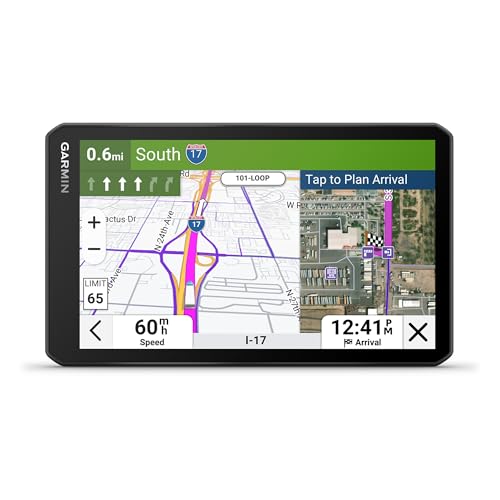
- Best for: the mainstream 7 inch truck navigator for most drivers
- ASIN: B0DBM44M3P (candidate — listing read in indexed form, live stock status not confirmed)
- Garmin part number: 010-02924-00
- Display: 7 inch touchscreen, 1024 x 600 resolution
- Dimensions: 7 x 4.2 x 0.8 inches per the listing

- Best for: drivers who want a built-in dash camera in the navigator
- ASIN: B0DBM36HT8 (candidate — listing read in indexed form, live stock status not confirmed)
- Garmin part number: 010-02927-00
- Display: 7 inch touchscreen
- Camera: built-in dash camera, 1080p HD recording, automatic incident saving
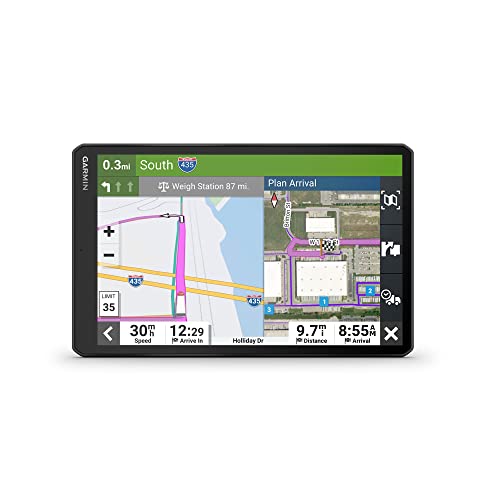
- Best for: the largest screen, for drivers who want guidance readable at maximum distance
- ASIN: B09ZKCK7PT (candidate — ASIN and specifications from indexed retailer and listing data, live page not read directly)
- Garmin part number: 010-02741-00
- Display: 10 inch touchscreen, listed at 10.1 inches in some retailer data
- Item weight: 1.2 pounds per retailer listing data
All 4 Picks at a Glance
| Product | Specs | Action |
|---|---|---|
| 1. Garmin dezl OTR720 |
| Check price on Amazon |
| 2. Garmin dezlCam OTR725 |
| Check price on Amazon |
| 3. Garmin dezl OTR1010 |
| Check price on Amazon |
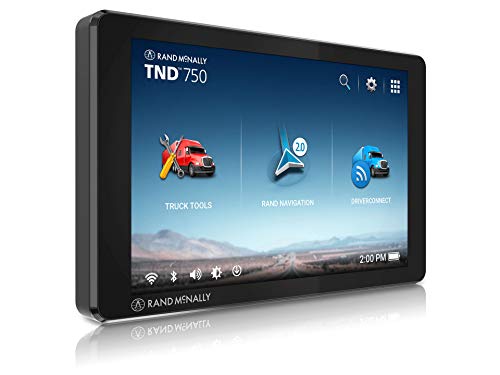 4. Rand McNally TND 750 |
| Check price on Amazon |
Key takeaways
- Compare the best GPS for 18 wheeler trucks: Garmin dezl and Rand McNally truck navigators with custom routing for your rig's height, length and weight.
As an Amazon Associate we earn from qualifying purchases.
A car GPS will happily route a 13 foot 6 inch, 80,000 pound combination vehicle toward a low bridge, a weight-restricted county road or a residential street with a truck prohibition, because it has no idea what you are driving. That is the whole reason truck navigators exist. A real GPS for an 18 wheeler lets you enter your rig’s height, width, length and weight, and then builds routes that avoid roads your truck cannot legally or physically use, with warnings for bridge heights, sharp curves and restrictions ahead. Every product in this guide is a dedicated truck navigator with that custom truck routing at its core. There are no car navigators and no phone apps presented as main picks here, because neither is a substitute for a device built around a truck profile.
This guide is a desk review based on manufacturer and listing specifications. No product is presented as personally tested. Specifications are taken from the product listing or brand material for each exact model, and the evidence level for every ASIN is stated in the product sections and summarised at the end, because some live pages could not be read directly during research.
Affiliate disclosure: This article contains affiliate links. If you buy through a link on this page, the site may earn a commission at no extra cost to you. That commission helps support independent buying guides, and it does not change which products are included or how their specifications are described.
Quick Picks
For most solo drivers and owner-operators, the Garmin dezl OTR720 is the balanced pick: a 7 inch high-resolution screen, custom truck routing, satellite imagery arrival planning and community parking and dock information. For a driver who wants the incident evidence built in rather than a second device on the windshield, the Garmin dezlCam OTR725 adds a 1080p dash camera with automatic incident recording to the same 7 inch platform. For maximum screen size on long days, the Garmin dezl OTR1010 stretches to a 10 inch display with the same truck routing approach. For a driver who prefers the Rand McNally ecosystem and its map presentation, the Rand McNally TND 750 is the established 7 inch alternative with Rand Navigation 2.0.
What Makes a Truck GPS Different
The defining feature is the truck profile. You enter the height, width, length and gross weight of your tractor and trailer combination, and the navigator routes against a road database that carries bridge clearances, weight limits, length restrictions and truck prohibitions. Garmin’s listing language states this directly: detailed maps offer custom truck routing for the size and weight of your rig, with the honest caveat that it is not available in all areas and that posted road signs and road conditions always take priority. That caveat is not fine print to skip. A navigator is an aid, never the authority, and every pick here should be used alongside signage, dispatch routing and your own judgement.
Around that core, the features that matter on a working truck are arrival planning, parking and services. Satellite aerial imagery of a destination helps you identify the correct truck entrance, security gate and dock approach before you are committed on a tight street. Community-sourced parking and loading dock information, truck service directories and weigh station features such as CAT Scale locations and PrePass bypass notifications all address the parts of the day that a car navigator does not know exist. Screen size is a practical safety choice rather than a luxury: a cab sits further from the windshield than a car seat does, and a 7 to 10 inch display keeps guidance readable at a glance.
1. Garmin dezl OTR720
- Best for: the mainstream 7 inch truck navigator for most drivers
- ASIN: B0DBM44M3P (candidate — listing read in indexed form, live stock status not confirmed)
- Garmin part number: 010-02924-00
- Display: 7 inch touchscreen, 1024 x 600 resolution
- Dimensions: 7 x 4.2 x 0.8 inches per the listing
the mainstream 7 inch truck navigator for most drivers
The OTR720 is the current centre of Garmin’s truck range, and its listing description reads like a checklist of what professional drivers actually asked for. Custom truck routing is built on the size and weight profile of your combination. Expert arrival planning uses high-resolution aerial views so you can see security gates, truck entrances and dock layouts before arrival. The dezl community features, delivered when the unit is paired with the dezl app on a compatible smartphone, surface trucker-rated parking and community-shared loading dock information from other drivers. Wind speed weather alerts arrive through the same app pairing, alongside road warnings for upcoming sharp curves and bridge heights.
Two working details deserve emphasis. The built-in search for nearby CAT Scale locations lets you verify a load is within legal limits before you are rolling toward a port of entry, which is the kind of feature that only exists because the designers talked to drivers. And with an active PrePass account, the unit can show weigh station and bypass notifications, saving the stop-and-start time that eats a driving day. The 1024 x 600 display is sharp for a 7 inch navigator, and at 8.5 ounces the unit itself is light, which matters for suction cup mounting on a working windshield.
The limitations are the standard ones for the class. Community data, wind alerts and traffic-style services depend on the smartphone app pairing, so a driver who refuses to pair a phone gets the routing and the maps but not the connected layer. Custom routing is also not available in all areas, as Garmin itself states. Treat the OTR720 as the default recommendation for a driver buying one navigator for general over-the-road work, and verify the live listing before purchase, because the specifications above come from an indexed read of the product page rather than a live in-stock confirmation.
2. Garmin dezlCam OTR725
- Best for: drivers who want a built-in dash camera in the navigator
- ASIN: B0DBM36HT8 (candidate — listing read in indexed form, live stock status not confirmed)
- Garmin part number: 010-02927-00
- Display: 7 inch touchscreen
- Camera: built-in dash camera, 1080p HD recording, automatic incident saving
drivers who want a built-in dash camera in the navigator
The dezlCam OTR725 takes the OTR720 formula and builds the camera into the same housing. The navigator records the drive in 1080p HD and automatically saves video of incidents, acting as an eyewitness record for the long haul. For a professional driver, that footage is not a gadget. In a dispute after a collision that was not your fault, a time-stamped forward view is often the difference between a clean file and a long argument with insurers, and having it integrated means one mount, one power cable and no separate camera to maintain.
Everything said about the OTR720’s routing applies here, because the navigation side is the same generation: custom routing for size and weight, high-resolution aerial arrival planning, dezl community parking and loading dock insights through the app, wind speed alerts, bridge height and sharp curve warnings, CAT Scale search and PrePass weigh station and bypass notifications with an active account. The included 16GB microSD card is a starter capacity for the camera rather than a long archive, and drivers who want extended recording history should plan a larger card within the device’s supported range and a habit of pulling important clips before they are overwritten.
Garmin’s own description carries a note that some jurisdictions regulate or prohibit use of a device of this kind, referring to the camera and recording functions. Camera and windshield mounting laws vary by state and by country, so confirm your operating areas allow both the mount position and the recording before relying on it. Choose the OTR725 over the OTR720 when the dash camera is a feature you would otherwise buy separately. Choose the plain OTR720 when your fleet already mandates a camera system, because duplicating it adds cost without adding evidence.
3. Garmin dezl OTR1010
- Best for: the largest screen, for drivers who want guidance readable at maximum distance
- ASIN: B09ZKCK7PT (candidate — ASIN and specifications from indexed retailer and listing data, live page not read directly)
- Garmin part number: 010-02741-00
- Display: 10 inch touchscreen, listed at 10.1 inches in some retailer data
- Item weight: 1.2 pounds per retailer listing data
the largest screen, for drivers who want guidance readable at maximum distance
The OTR1010 answers a simple problem: in a high cab, with the navigator mounted where it does not block the view of the mirrors or the road, a 7 inch screen can be a long way from the driver’s eyes. A 10 inch display makes street names, lane guidance and arrival imagery readable at a glance, which is exactly how a navigator should be used at highway speed. The routing approach is the same dezl formula, with custom truck routing based on the size and weight of the rig, high-resolution BirdsEye satellite imagery for arrival planning, and a directory of truck and trailer services.
The mounting hardware in the box is a genuine differentiator at this size. A screen this large needs more than a basic suction cup, and the listed package includes a powered magnetic mount on the suction cup, a screw-down mount option and a 1 inch ball adapter with AMPS plate, which lets the unit integrate with the ball mount systems many trucks already carry. That flexibility matters because a heavy navigator that creeps, vibrates or falls at the first rough expansion joint is worse than a smaller unit that stays put.
The trade-offs are physical. A 10 inch device at 1.2 pounds takes real windshield or dash space, can intrude on sight lines in smaller cabs, and is the unit most likely to conflict with a fleet’s windshield mounting rules. It is also an earlier model generation than the OTR720 series, so its feature set should be compared line by line on the live listing rather than assumed to match the newest units. Evidence note: this ASIN comes from indexed retailer data for the OTR1010 rather than a direct read of the live Amazon page, which could not be opened during research. Verify the model number 010-02741-00, the screen size and a live seller on the product page before ordering.
4. Rand McNally TND 750
- Best for: drivers who prefer Rand McNally maps and the TND interface
- ASIN: B089XB9MQR (candidate — ASIN from indexed Amazon listing data, live page returned an access error during research)
- Model number: TND750
- Display: 7 inch touchscreen
- Navigation software: Rand Navigation 2.0 with downloadable updated maps, listed with 2025 map downloads
drivers who prefer Rand McNally maps and the TND interface
Rand McNally built its name on truck atlases, and the TND line is the electronic continuation of that relationship. The TND 750 is a 7 inch truck navigator running Rand Navigation 2.0, with custom routing based on the dimensions of your truck, live traffic and construction information in its feature set, weather overlays, junction views and millions of truck-specific points of interest in the listing material. Drivers who learned the road on Rand McNally mapping often find its presentation and its points of interest database the most natural to work with, and that familiarity is a legitimate buying reason rather than a cosmetic one.
The honest context is that the TND 750 is an older platform than the current Garmin dezl generation. Its listing material advertises downloadable 2025 maps, which means map currency depends on the driver actually performing the download and update process, and the hardware specifications published in listing data, such as its modest onboard storage, reflect its generation. None of that prevents it from doing the core job: profile-based truck routing on a clear 7 inch display. It does mean a buyer should confirm on the live listing that the unit being sold is new stock with a working update path, rather than old inventory, and should treat the renewed version of this model, which adds a built-in dash camera, as a separate listing with its own code and its own warranty terms.
Evidence note for this pick is the weakest in the guide and is stated plainly: the live Amazon page for this ASIN could not be read during research, returning an access error, so the model details above come from indexed Amazon listing data and retailer price tracking for the same code, which showed the listing active on Amazon US. Confirm the title, the model number TND750 and the map update terms on the live page before purchase.
How to Choose Between These Four
Start with the screen you can actually mount. Measure the space where the navigator will live, check your carrier’s rules on windshield devices, and be honest about your eyesight at cab distance. A 7 inch unit suits most day cabs and regional work. The 10 inch OTR1010 earns its space on long-haul trucks where the mount position is further away and the truck already has a ball mount fitted.
Next, decide the camera question. If you have no dash camera and no fleet system, the dezlCam OTR725 combines two purchases into one mount and one cable. If a camera is already mandated or fitted, the same money buys nothing extra in the camera model, and the OTR720 is the cleaner choice.
Then weigh the connected features against your habits. Community parking data, wind alerts and dock information on the Garmin side depend on pairing the dezl app on a compatible smartphone. A driver who will not pair a phone should judge these units on routing, maps and arrival imagery alone, which is also the fair basis for comparing the Rand McNally, whose strength is its mapping and points of interest rather than a connected community layer.
Finally, whichever unit you choose, set the truck profile up properly before the first dispatch, and update it every time the trailer or load configuration changes the numbers that matter. A truck navigator with a stale height or weight profile is only a car GPS with a bigger screen. Keep the maps updated, defer to posted signs over any device, and verify every ASIN in this guide on the live Amazon US page before ordering: all four are candidates based on indexed listings and retailer data, because live product pages could not be fully read during research.
Verdict
The best gps for 18 wheeler trucks is the one whose routing is built around your rig’s dimensions and whose screen you can read without leaning. On published specifications, that makes the Garmin dezl OTR720 the default pick for most drivers, the dezlCam OTR725 the pick when a built-in 1080p dash camera earns its place, the dezl OTR1010 the pick for maximum screen size and mounting flexibility, and the Rand McNally TND 750 the pick for drivers loyal to Rand McNally mapping who accept an older platform and a map update routine. Set the profile, keep the maps current, and let the signs on the road have the final word.