We independently review everything we recommend. When you buy through our links, we may earn a commission. As an Amazon Associate we earn from qualifying purchases.
Best AIO CPU Coolers
Find the best AIO CPU coolers for quiet, high-performance builds. Compare 360mm liquid coolers by radiator size, fans, socket support, and fit before you buy.
Find the best AIO CPU coolers for quiet, high-performance builds. Compare 360mm liquid coolers by radiator size, fans, socket support, and fit before you buy.
Introduction
The best AIO CPU coolers combine a sealed liquid loop, a large radiator, and quiet fans to keep a powerful processor under control without the bulk of a tall air tower. An all-in-one liquid cooler moves heat away from the CPU through coolant in a closed loop, so the radiator and its fans can sit at the edge of the case where airflow is strongest. That layout suits high-end gaming processors, workstation chips, and compact builds where a large air cooler would block memory slots or press against the side panel.
Choosing the right model comes down to radiator size, case clearance, socket support, noise, and how much control you want over lighting and fan curves. A 360mm radiator cools more than a 240mm one, but it also needs a case with three 120mm fan mounts in a row and enough depth for the radiator plus fans. A cooler with a thick radiator cools well but can clash with tall memory or a top-mounted motherboard tray. This guide compares five 360mm all-in-one liquid CPU coolers that cover performance, value, lighting, and showcase builds, so you can match one to your processor and your case.
Quick answer: For most high-performance builds, the ARCTIC Liquid Freezer III Pro 360 is the strongest all-round pick thanks to its thick radiator, dedicated VRM fan, and quiet fan design. Builders who want simple ARGB lighting without a separate controller should look at the CORSAIR Nautilus 360 RS ARGB, while the Thermalright Aqua Elite 360 V3 is the sensible choice when the budget is tight but a full 360mm radiator is still wanted.
Radiator size is the first decision, because it sets both cooling capacity and fit. A 360mm radiator holds three 120mm fans and suits high-wattage processors, sustained rendering, and overclocking headroom. Before ordering, measure the mounting area in your case and check the manual for the maximum radiator thickness it accepts. Remember that the total depth is the radiator plus the fans, so a thick radiator can need more than 60mm of clearance. Also check that the radiator will not collide with tall memory modules, motherboard heatsinks, or the top of the graphics card when mounted at the front.
Radiator Thickness and Fan Design
A thicker radiator gives the coolant more surface area to shed heat, but it also demands more space and stronger fans. A standard 27mm radiator fits most mid-tower cases, while a 38mm radiator cools more effectively at the same fan speed yet may only fit cases with generous top or front clearance. Fan design matters just as much: fans built for radiators use high static pressure to push air through dense fins, while ordinary case fans move air freely but stall against resistance. Look for PWM control, fluid-dynamic or magnetic bearings, and a fan speed range that stays quiet at idle and ramps up only under load.
CPU Socket Compatibility
Every cooler in this guide supports the current mainstream sockets, but you should still confirm your exact socket before buying. Modern AMD builds use AM5, with AM4 still common in older systems, while Intel builds use LGA 1700 or the newer LGA 1851. Most kits include brackets for both platforms in the box, and some add a contact frame for Intel installs that improves pressure across the processor. Check whether your socket needs a separate bracket, whether the mounting uses the stock backplate, and whether the pump block clears nearby capacitors or memory slots once fitted.
Noise Levels and Pump Design
An AIO has two noise sources: the fans and the pump. The pump circulates coolant through the loop and usually runs at a steady speed, so a well-designed pump is barely audible inside a closed case. Fans are the louder part, and their noise depends on speed, blade design, and bearing type. A cooler with a quiet pump and PWM fans lets you build a fan curve that keeps the system near-silent during web browsing and office work, then spins up only when the processor is under sustained load. If silence matters to you, favour coolers known for low pump noise and fans that can run slowly without rattling or humming.
Lighting, Software, and Cabling
Lighting and software divide AIO coolers into two camps. Some connect straight to the motherboard with standard ARGB and PWM headers, so you control lighting through the motherboard software and keep cabling simple. Others use a proprietary hub or a dedicated app for lighting effects, fan curves, and on-screen displays, which adds features but also adds a cable, a USB header, and another program running in the background. Decide which you prefer before buying: a direct motherboard connection is simpler and easier to move between builds, while a dedicated ecosystem suits builders who already use that brand across fans, memory, and cases.
Warranty, Tubing, and Long-Term Ownership
An AIO is a sealed unit, so the warranty is a useful signal of how long the maker expects it to last. Longer warranties, typically five or six years, suggest confidence in the pump, seals, and tubing. Check the tubing length as well: short tubes limit where the radiator can sit relative to the pump block, while longer sleeved tubes route more neatly in large cases. Mount the radiator so the pump is not the highest point in the loop, keep the tubes free of sharp kinks, and leave enough slack for the side panel to close without pressing on a fitting.
The ARCTIC Liquid Freezer III Pro 360 is built around cooling first and decoration second. Its 38mm thick radiator is deeper than the standard 27mm radiators used by most rivals, giving the coolant more surface area, and it ships with three P12 PWM PST fans that daisy-chain together to cut down on cabling. A small VRM fan on the pump block blows air across the motherboard power circuitry around the socket, which helps in builds where the processor draws heavy power for long periods. The cold plate uses a native offset mount for AM5 processors, placing the contact area over the hottest part of the chip.
This cooler suits builders who want strong thermal headroom for a high-end processor and do not mind a thicker radiator or a slightly more involved Intel installation, which uses an included contact frame. It supports Intel LGA 1851 and LGA 1700 alongside AMD AM5 and AM4, and the plain black finish suits builds without lighting. Skip it if your case cannot fit a 63mm stack of radiator plus fans, or if you want an LCD screen or ARGB lighting on the pump, because this version offers neither. For pure cooling ability in a 360mm AIO, it is the pick to measure the others against.
The CORSAIR Nautilus 360 RS ARGB is the straightforward choice for builders who want lighting without a hub or extra software. Its three RS120 ARGB fans daisy-chain together and connect directly to the motherboard, with one PWM header for fan speed and one ARGB header for lighting, so there is no separate controller to mount or power. The fans use AirGuide technology and magnetic dome bearings, and the pump is designed to run quietly. A convex cold plate with pre-applied thermal paste helps the cooler make firm contact with the processor heat spreader, and the 27mm radiator fits a wide range of mid-tower cases.
This cooler suits first-time liquid cooling builders and anyone who already controls lighting through their motherboard and wants the cooler to follow the same setup. It supports Intel LGA 1851 and LGA 1700 and AMD AM5 and AM4, and it carries a five-year warranty. Skip it if you want a screen on the pump or control through a dedicated app with per-fan curves and lighting profiles, because this model deliberately keeps things simple. For a clean, low-fuss ARGB build, it is one of the easiest 360mm AIOs to live with.
The Thermalright Aqua Elite 360 V3 exists for builders who want a full-size 360mm radiator without paying for a display, a hub, or premium branding. It pairs a 360mm radiator with three 120mm PWM fans on S-FDB bearings and a PWM-controlled pump, giving you the radiator area that matters most for cooling a hot processor. Socket support is broad, covering AMD AM4 and AM5 and Intel sockets from LGA 1150 through LGA 1700 and LGA 1851, so it fits both new builds and upgrades to older systems.
This cooler suits budget-focused builds, second PCs, and anyone upgrading from a stock cooler or a small air tower who wants a clear step up in cooling capacity. The ARGB lighting on the fans adds colour without needing a separate controller, and the standard radiator thickness keeps case fit simple. Skip it if you want the quietest pump on the market, a screen on the pump block, or the most polished software control, because those features sit in a higher bracket. As a value-first 360mm AIO, it covers the essentials well and leaves room in the budget for other parts.
The LIAN LI Galahad II Trinity Performance 360 is the showcase pick in this roundup. It combines a 360mm radiator with high-speed ARGB fans that spin up to 2400 RPM, giving it strong airflow for demanding processors, and three interchangeable pump caps let you change the look of the pump block to match the rest of the build. The 27mm radiator keeps it compatible with most cases that accept a 360mm mount, and the L-Connect software controls lighting and fan behaviour across other Lian Li parts in the same system.
This cooler suits builders who care about presentation as much as cooling, especially in a tempered-glass case where the pump block and fans are on display. The high fan speed gives it headroom for hot-running processors, though you will want to set a fan curve that keeps the fans slow at idle. Skip it if you are building on Intel LGA 1851, because the maker does not clearly list that socket for this model, so confirm mounting support on the maker site before ordering. Skip it too if you prefer a cooler with no lighting software at all. For a bright, coordinated build with serious cooling behind it, it is a strong choice.
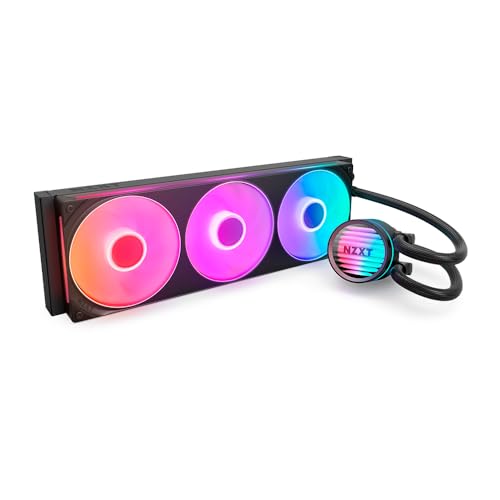
The NZXT Kraken Core 360 RGB is the entry point into NZXT liquid cooling, and it keeps the formula simple. Instead of three separate fans, it uses a single-frame F360 RGB Core fan unit that covers the whole 360mm radiator, which means fewer cables and a cleaner install. The Turbine pump is designed for strong coolant flow with low noise, and the cooler connects directly to the motherboard without a separate hub. It supports AMD AM5 and AM4 and Intel LGA 1851, LGA 1700, LGA 1200, and LGA 115X, covering most current and recent builds.
This cooler suits builders who want RGB lighting and a tidy install without the cost or complexity of a screen-equipped flagship. The single-frame fan simplifies wiring in a way that first-time builders will appreciate, and the black finish blends into most cases. Skip it if you want an LCD display on the pump, individual fan control, or the longest warranty in this guide, because the Core line trades those extras for simplicity. As a first 360mm AIO, it is an approachable and well-finished option.
Measure your case before you order anything. A 360mm radiator needs three 120mm fan mounts in a row, and the total depth of radiator plus fans must fit without pressing against memory, motherboard heatsinks, or the graphics card. Check the tubing length too, and plan the route from the pump block to the radiator so the tubes do not kink or strain a fitting.
Confirm socket support for your exact processor, including whether an Intel build needs a contact frame or a specific bracket. Look at how the cooler connects: direct motherboard headers are simplest, while hubs and apps add features at the cost of extra cables and software. Set your expectations on noise as well, since a cooler with a quiet pump and PWM fans is easier to tune for silent idle operation.
Finally, think about the long term. A longer warranty is worth having on a sealed liquid cooler, and a radiator mounted with the pump below the highest point of the loop helps the pump last. Keep the receipt and the mounting hardware, because a cooler that survives a processor upgrade is one you can carry into your next build.
FAQ
Are AIO CPU coolers better than air coolers?
An AIO usually cools a high-wattage processor more effectively than a similarly sized air cooler, because the radiator can sit where case airflow is strongest and the coolant moves heat away from the socket. Air coolers are simpler, have no pump to wear out, and often cost less for the same processor. For mid-range processors, a good air cooler is enough; for flagship processors under sustained load, a 360mm AIO gives more headroom.
What radiator size do I need for gaming?
A 240mm radiator suits most gaming processors, while a 360mm radiator is the safer choice for flagship processors, heavy multitasking, and builds where the processor runs at full load for long sessions. The larger radiator lets the fans run slower for the same cooling, which keeps noise down. Always check that your case has a 360mm mount before choosing the larger size.
Do AIO coolers need maintenance or refilling?
Most all-in-one coolers are sealed at the factory and need no refilling or regular maintenance. Dust on the radiator fins should be cleaned from time to time, and fan curves should be checked after a major system change. If the pump becomes loud or temperatures climb without explanation, check the mounting pressure and fan operation first, then contact the maker under warranty.
How long does an AIO CPU cooler last?
A well-made AIO typically lasts through several years of daily use, and warranties in this guide run from five to six years depending on the model. The pump is the part most likely to wear out over time, while the radiator, tubing, and fans usually outlast it. Keeping the radiator free of dust and avoiding sharp kinks in the tubing helps the cooler reach the end of its warranty period.
Can I mount a 360mm AIO at the top or front of my case?
Both positions work, and the right choice depends on your case and graphics card. A top mount exhausts warm air out of the case and keeps the pump below the radiator, which is good for pump longevity. A front mount brings cool outside air through the radiator first, which can lower CPU temperatures but adds warm air to the rest of the case. Check your case manual for supported radiator positions and sizes before deciding.
Bottom Line
The best AIO CPU coolers in this guide all use a 360mm radiator, but they serve different builders. The ARCTIC Liquid Freezer III Pro 360 is the top pick for cooling performance, the CORSAIR Nautilus 360 RS ARGB is the easiest way to add lighting without a hub, and the Thermalright Aqua Elite 360 V3 brings a full-size radiator to tighter budgets. The LIAN LI Galahad II Trinity Performance 360 suits showcase builds, while the NZXT Kraken Core 360 RGB keeps the install simple for first-time liquid cooling buyers. Measure your case, confirm your socket, and pick the model that matches how you actually use your PC.
Disclosure: As an Amazon Associate, we may earn from qualifying purchases.
A
admin
We compare specs, materials and verified owner reviews before a product earns a spot. Rankings are never paid.
Affiliate disclosure. As an Amazon Associate we earn from qualifying purchases at no extra cost to you. Prices accurate as of the date shown.
Only three cylindrical purifiers on Amazon pair a particle prefilter with real carbon. Compare an 18 lb carbon bed, a Vocarb canister and a smart tower.
Compare electric start generators by running watts on each fuel, outlet type, tank size and start backup, with four Amazon listings that name electric start.
The best window fans for cooling pull in cool evening air and exhaust hot indoor air. Compare five twin and low-profile window fans by fit, speeds, and reversing.
Five generators with a genuine 50 amp 14-50R outlet confirmed from maker and listing specs, covering dual fuel, maximum output and one true inverter option for RV power.
Compare five wired gaming mice on sensor, weight, buttons and cable feel, from the Logitech G203 and G502 HERO to the Razer Basilisk V3 and HyperX Haste 2.
Five rose supports whose own listings name climbing roses, from a wrought iron obelisk to compact pot trellises, with sizing and rust notes for each pick.
Four dual motor uprights for wide hallways, all from the one line whose listings state a 2-motor system, compared on bags, lift-up design, and pet tools.
Shop the best sales on cordless mowers with three verified battery picks compared by deck size, battery platform, runtime and drive type for your yard.


 Thermalright Aqua Elite 360 V3 (B0CCNTYLP2)
 LIAN LI Galahad II Trinity Performance 360 (B0CNZD995J)
 NZXT Kraken Core 360 RGB (B0FLTZ2SHM)